

Password Strength Checker – Test Your Password and See the Crack Time
Password Strength Checker
This free password strength checker shows how secure your password really is. We evaluate the complexity instantly.

Quick answer
To use this password strength checker, type or paste a password into the box. It instantly shows a strength level (Weak, Fair, Good or Very Strong), an estimated time to crack and a checklist for length, uppercase, lowercase, numbers and symbols. The estimate penalises common passwords, keyboard patterns, repeated characters and simple swaps like @ for a. Everything runs in your browser and nothing is sent anywhere.
Most people believe their password is stronger than it really is. Adding a capital letter and an exclamation mark to a common word looks complex, but attackers try those patterns first. This free password strength checker gives you a realistic answer: a strength level, an estimated crack time and a clear list of what to improve.
I rebuilt the scoring so it behaves like a real attacker would. Instead of simply counting character types, it estimates entropy and then cuts it down for common passwords, leetspeak swaps, keyboard runs such as qwerty, number sequences, repeated characters and passphrases built from everyday words.
Password Strength Checker Features
| Feature | How it works |
|---|---|
| Realistic scoring | Entropy-based estimate with penalties for predictable patterns |
| Crack time estimate | Assumes a fast offline attack of 10 billion guesses per second |
| Common password check | Catches well-known passwords, even with swaps like P@ssw0rd |
| Pattern detection | Spots keyboard runs, number sequences and repeated characters |
| Passphrase aware | Scores multi-word passphrases by the number of words |
| Requirements checklist | Length 8+, uppercase, lowercase, number and symbol |
| Strong generator | Creates a 16-character password using secure browser randomness |
| 100% private | Runs in your browser; your password is never sent or stored |
How to Use the Password Strength Checker
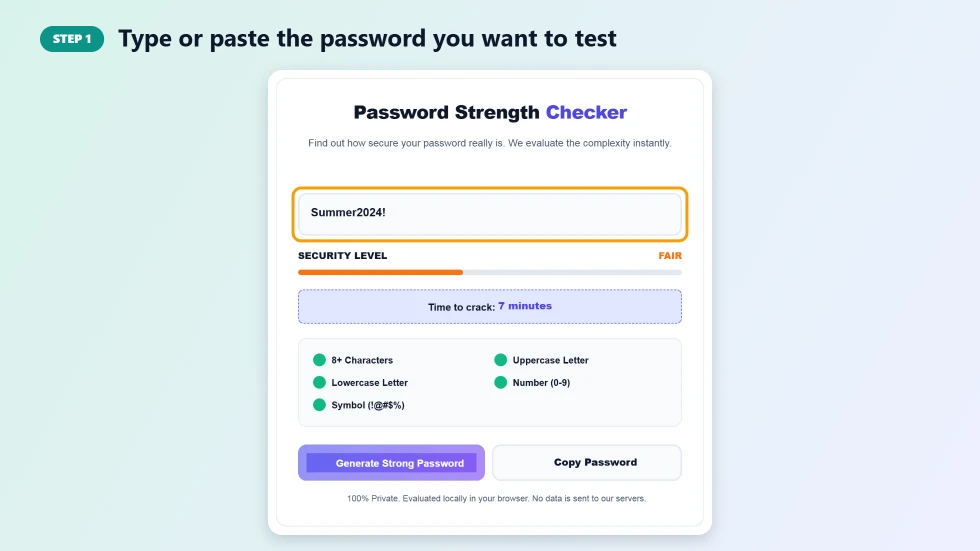
Step 1: Type or paste the password you want to test
Click the password box and type or paste the password. Use the eye button to show or hide what you typed. If you would rather not test a real password, type one with the same pattern, such as the same length and the same kind of word and numbers.
Step 2: Read the strength level, crack time and checklist
The meter shows Weak, Fair, Good or Very Strong, and Time to crack shows roughly how long a fast offline attack would need. The checklist below turns green for each requirement you meet. A password can tick every box and still be weak if it is a common word with small changes.

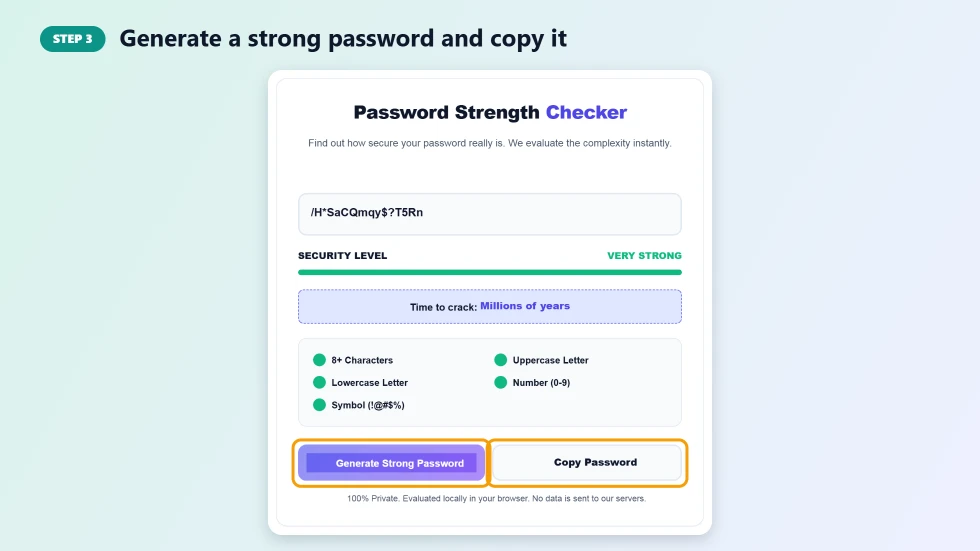
Step 3: Generate a strong password and copy it
Press Generate Strong Password to create a random 16-character password with letters, numbers and symbols, made with your browser's secure random number generator. Press Copy Password and save it in a password manager.
What Makes a Password Strong
- Length first: every extra character multiplies the number of guesses needed. Aim for 14 or more.
- Randomness: a random mix of characters beats a clever-looking word with swaps.
- Uniqueness: use a different password for every account so one leak cannot unlock others.
- Passphrases: four or more unrelated words, such as blue-tiger-rocket-lamp, are long and easy to remember.
- No personal details: names, birthdays, pets and years are among the first things attackers try.
How the Crack Time Is Estimated
This password strength checker estimates how many guesses a password needs, measured in bits of entropy. It starts from the length and the types of characters used, then reduces the score for patterns that make guessing easier, such as common passwords, a word followed by a year, keyboard sequences or repeated letters. The time shown assumes a fast offline attack at 10 billion guesses per second, which is realistic for leaked password databases protected by weak hashing. Real attacks against a website login are usually much slower, but this worst case is the safer one to plan for.
Password Strength Checker Tips to Keep Your Accounts Safe
- Use a password manager to create and store a unique password for each site.
- Turn on two-factor authentication for email, banking and social media.
- Change a password immediately if a service you use reports a data breach.
- Never share passwords by text, email or chat.
- Avoid typing important passwords on shared or public computers.
Frequently Asked Questions
Is it safe to type my password into this checker?
Yes. The password strength checker runs entirely in your browser. Your password is never sent to a server, saved or logged. For extra peace of mind you can test a password with the same pattern instead of your real one.
Why is P@ssw0rd! rated weak?
It is a very common password with predictable swaps (@ for a, 0 for o) and a symbol on the end. Attackers try these variations first, so it would be cracked almost instantly.
How long should my password be?
At least 12 characters, and 14 or more for important accounts. Longer random passwords and passphrases are much harder to crack.
Are passphrases better than complex passwords?
A passphrase of four or more random, unrelated words is both strong and easy to remember. Song lyrics or famous quotes are weaker because attackers use them too.
What does time to crack mean?
It is an estimate of how long a fast offline attack, testing 10 billion guesses per second, would need to find the password. It is a guide, not a guarantee.
How does the password generator work?
It builds a 16-character password from uppercase and lowercase letters, numbers and symbols using the browser's secure crypto random number generator.