

Bcrypt Hash Generator – Create and Verify Password Hashes Online
BCrypt Hash Generator
Use this free bcrypt hash generator to create secure password hashes or verify existing ones. Designed for developers.
Your hash will appear here...
Quick answer
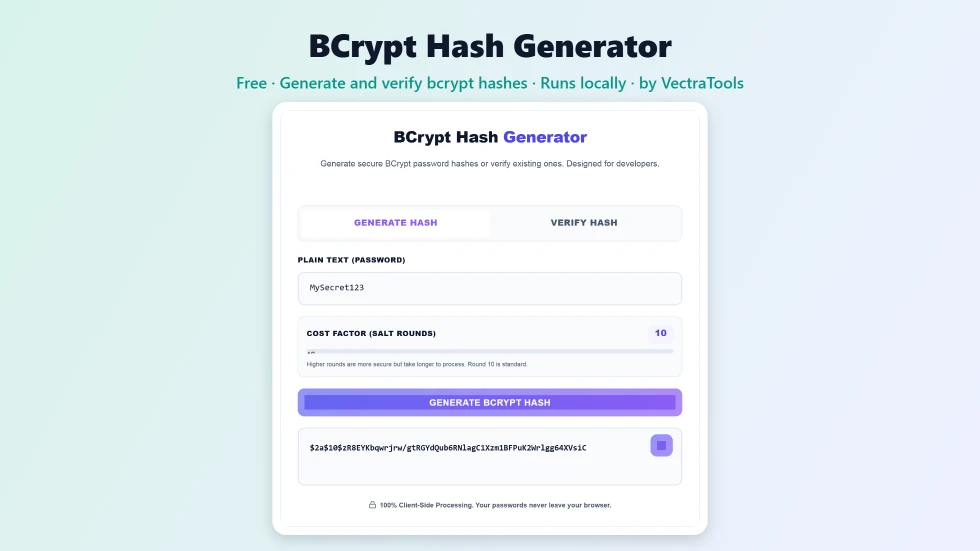
To use this bcrypt hash generator, type a password on the Generate Hash tab, choose a cost factor from 8 to 14 (10 is standard) and press Generate BCrypt Hash. You get a 60-character hash starting with $2a$ that includes its own random salt. To check a password, open Verify Hash, enter the password and the hash, and press Verify Match. Everything runs in your browser.
Bcrypt is one of the most trusted ways to store passwords. Unlike fast hashes such as MD5 or SHA-256, it is deliberately slow and adds a random salt to every hash, which makes large-scale cracking far harder. This free bcrypt hash generator lets developers create bcrypt hashes for testing, seeding databases or migrating users, and check whether a password matches an existing hash.
The tool uses the open-source bcryptjs library and runs locally, so passwords are never sent anywhere. I tested both directions: hashes made here verify correctly, and wrong passwords are rejected.
Bcrypt Hash Generator Features
| Feature | How it works |
|---|---|
| Generate and verify | Two tabs: Generate Hash and Verify Hash |
| Adjustable cost factor | Choose 8 to 14 salt rounds; 10 is the common default |
| Automatic salt | Each hash gets a new random salt built into the result |
| Standard format | 60-character $2a$ hashes compatible with PHP, Node.js, Python and most frameworks |
| Show or hide input | Eye buttons reveal the password while you type |
| One-click copy | Copy the generated hash instantly |
| Clear match result | MATCH or NO MATCH message when verifying |
| Private | Runs in your browser; passwords never leave your device |
How to Use the Bcrypt Hash Generator
Step 1: Enter the password and choose the cost factor
On the Generate Hash tab, type the password in Plain Text. Drag the Cost Factor slider to set the salt rounds. Each step up doubles the work, so 12 takes four times longer than 10. Use 10 to 12 for most web apps.

Step 2: Generate the bcrypt hash and copy it
Press Generate BCrypt Hash. After a moment the hash appears, for example $2a$10$ followed by 53 characters. The first part shows the version and cost, the next 22 characters are the salt and the rest is the hash. Press the copy button to use it in your code or database.

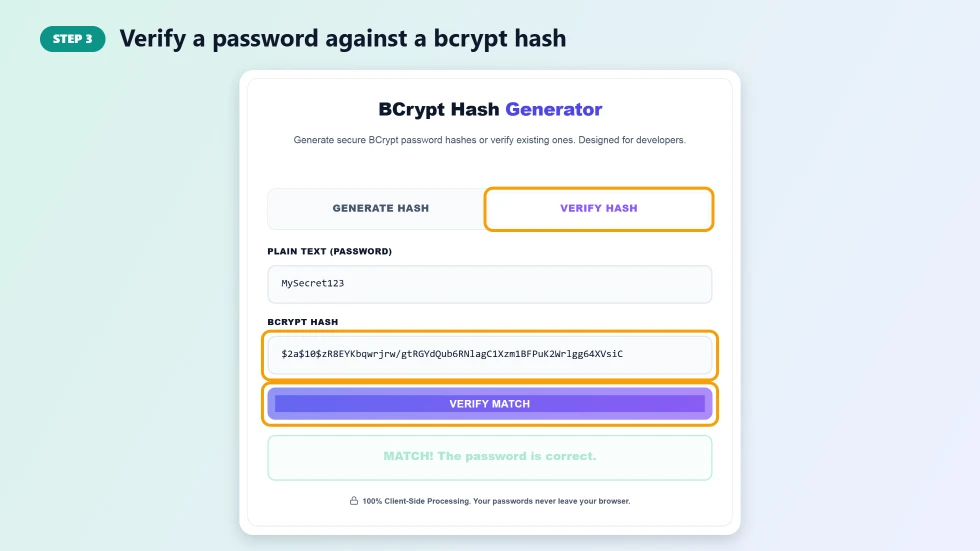
Step 3: Verify a password against a bcrypt hash
Open the Verify Hash tab, type the password, paste the bcrypt hash and press Verify Match. The tool reads the salt and cost from the hash, recomputes it and shows MATCH if the password is correct or NO MATCH if it is not.
Why Bcrypt Is Used for Passwords
- Slow on purpose: the cost factor makes each guess expensive, which slows attackers down.
- Built-in salt: identical passwords produce different hashes, defeating rainbow tables.
- Future-proof: raise the cost factor as computers get faster.
- Widely supported: available in PHP password_hash, Node.js, Python, Ruby, Java and Go.
Choosing a Cost Factor
The cost factor is a power of two: cost 10 means 2^10 rounds. A good rule is to choose the highest cost that keeps login time around a quarter of a second on your server. In a browser, cost 12 or above may take several seconds, which is normal. Most frameworks default to 10 or 12.
Bcrypt Hash Generator Tips for Developers
- Never store plain passwords or fast hashes like MD5 or SHA-1 for user logins.
- Bcrypt only uses the first 72 bytes of a password; very long passwords are truncated.
- Hashes starting with $2a$, $2b$ and $2y$ are variants of the same algorithm and are usually interchangeable.
- Use this tool for testing and seeding, and hash real user passwords on your server.
- Consider Argon2id for new systems if your platform supports it.
Frequently Asked Questions
Is this bcrypt hash generator free?
Yes. It is free with no sign-up and no limits.
Is my password sent to a server?
No. Hashing and verification run entirely in your browser using the bcryptjs library.
Why do I get a different hash every time?
Bcrypt adds a new random salt each time. Different hashes of the same password are expected, and all of them will verify correctly.
Can a bcrypt hash be decrypted?
No. Bcrypt is a one-way function. You can only check a password by hashing it with the same salt and comparing the result.
What cost factor should I use?
10 is the common default and 12 is a good choice for most modern servers. Higher values are more secure but slower.
Will hashes from this tool work in PHP or Node.js?
Yes. The standard $2a$ format is accepted by PHP password_verify, Node.js bcrypt libraries and most other implementations.