

Random Salt Generator Online – Secure Salts and Tokens in Hex and Base64
Random Salt Generator
Use this free random salt generator online to create cryptographically secure salts and API tokens in hex and Base64.

Quick answer
To use this random salt generator, set the length with the slider from 8 to 128 bytes (32 bytes, or 256 bits, is the usual choice) and press Generate New Salts. The tool creates fresh random bytes with the Web Crypto API and shows them three ways: hexadecimal, standard Base64 and URL-safe Base64 without padding. Press Copy next to the format you need. Nothing is sent over the network.
A salt is a random value added to data before hashing, so identical inputs produce different hashes. Developers also need random strings for API keys, session secrets, CSRF tokens and encryption keys. This free random salt generator creates them with your browser's cryptographically secure random number generator, not a predictable formula.
I checked that all three outputs encode exactly the same bytes, so you can safely switch between hex and Base64 in your code. Because generation happens locally, the secrets you create are never seen by anyone else.
Random Salt Generator Online Features
| Feature | How it works |
|---|---|
| Crypto-secure randomness | Uses window.crypto.getRandomValues from the Web Crypto API |
| 8 to 128 bytes | Choose the length with a slider; 32 bytes is the default |
| Hexadecimal output | Two hex characters per byte, easy to store and compare |
| Base64 output | Standard Base64 with padding |
| URL-safe Base64 | Uses - and _ with no padding, ideal for URLs and JWT secrets |
| Character counts | Shows the length of each output |
| One-click copy | Separate copy buttons for every format |
| Private | Generated in your browser and never transmitted |
How to Use the Random Salt Generator Online
Step 1: Choose the salt length in bytes
Drag the String Length slider to choose how many random bytes to generate. 16 bytes (128 bits) is enough for password salts, while 32 bytes (256 bits) is a strong default for API keys, secrets and encryption keys.

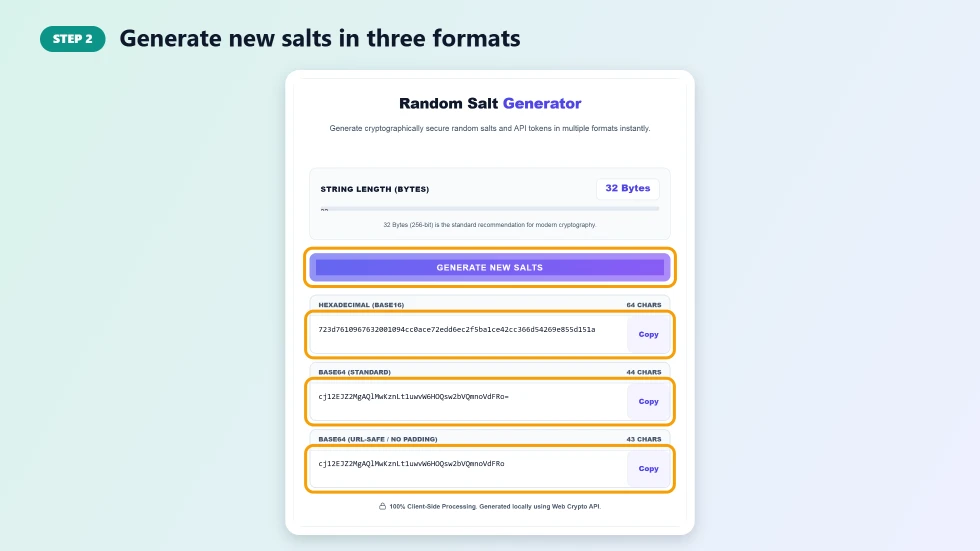
Step 2: Generate new salts in three formats
Press Generate New Salts. The same random bytes are shown as Hexadecimal (Base16), Base64 (Standard) and Base64 (URL-Safe / No Padding), with the character count of each.
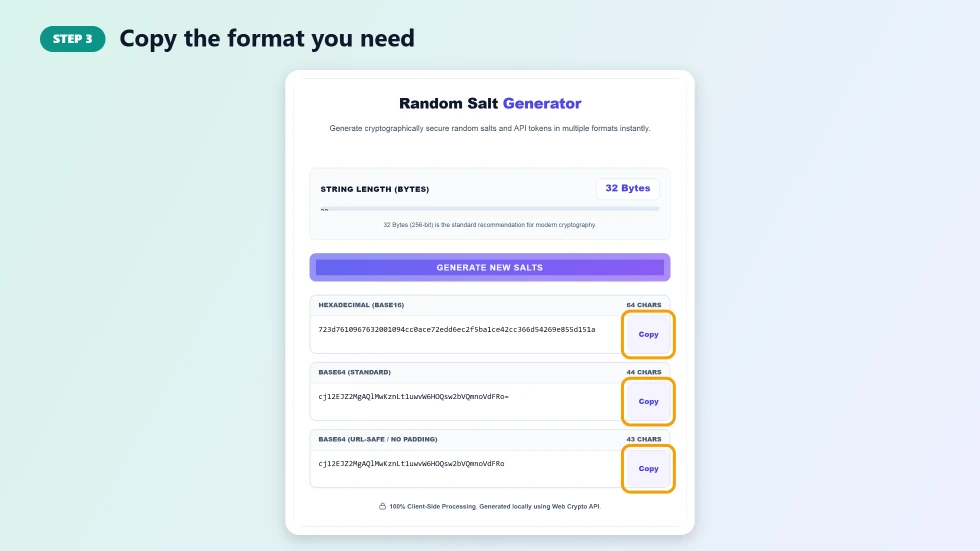
Step 3: Copy the format you need
Press Copy next to the format your code or config expects. Use hex for databases and logs, standard Base64 for most libraries and URL-safe Base64 for tokens that go in URLs, cookies or environment variables.
What Salts and Tokens Are Used For
- Password hashing: a unique salt per user stops rainbow-table attacks.
- API keys and secrets: long random strings that are impossible to guess.
- Session and CSRF tokens: random values that tie requests to a real session.
- Encryption keys and IVs: random bytes for AES and other ciphers.
- JWT signing secrets: high-entropy secrets for HMAC-signed tokens.
Random Salt Generator Tips
- Generate a new, unique salt for every password, never reuse one salt for all users.
- Store salts alongside the hash; they do not need to be secret, only unique.
- Keep API keys and signing secrets private and rotate them if they leak.
- Modern password libraries like bcrypt and Argon2 create salts automatically; use this tool for other secrets or custom schemes.
- Prefer 32 bytes or more for anything that protects access.
How Many Bytes Do You Need?
Security is measured in bits: each byte adds 8 bits of randomness. 16 bytes gives 128 bits, which is already far beyond brute force. 32 bytes gives 256 bits and matches the key size of AES-256. Going above 64 bytes rarely adds practical security, but the random salt generator allows up to 128 bytes for systems that require long secrets.
Frequently Asked Questions
Is this random salt generator free?
Yes. It is free with no sign-up and no limits.
Is the randomness secure?
Yes. It uses the browser's Web Crypto API (crypto.getRandomValues), which is designed for cryptographic use.
What length should a salt be?
At least 16 bytes for password salts. For API keys, secrets and encryption keys, 32 bytes is a strong standard.
What is the difference between Base64 and URL-safe Base64?
URL-safe Base64 replaces + and / with - and _ and drops the = padding, so the value can be used in URLs and filenames without escaping.
Do salts need to be kept secret?
No. Password salts can be stored next to the hash. They only need to be unique and random. API keys and signing secrets, however, must be kept private.
Are the generated salts stored anywhere?
No. They are created in your browser and are never sent to VectraTools or anyone else.