

Emoji Art Generator – Turn Text Into Emoji Art Free
Emoji Art Generator
Convert text into emoji patterns. Use "Compact" mode for WhatsApp, or download as a high-quality PNG image for Instagram.

Quick answer
An emoji art generator turns letters into big block patterns built from emojis. Type a short word, choose one emoji for the letters and another for the background, pick a size, and click Generate Art. You can then copy the emoji text for WhatsApp or social media, save it as a .TXT file, or export it as a PNG image.
Our free emoji art generator is a quick way to send a big HI, a LOVE message, a birthday greeting or a team name made entirely of hearts, stars or fire emojis. It works on phones and computers, needs no sign-up and keeps everything in your browser.
Because the result is plain text, the emoji art pastes anywhere emojis are supported, including WhatsApp, Telegram, Instagram captions, Facebook posts and Discord.
Emoji Art Generator Settings
| Setting | What it controls |
|---|---|
| Text to convert | The word or letters drawn in emoji. Short words of 2 to 5 letters look best |
| Foreground emoji | The emoji used to draw the letters, such as 💚 or ⭐ |
| Background emoji | The emoji that fills the space around the letters, such as 🤍 |
| Optimization size | Compact for WhatsApp, Standard for social media, Large for detailed art |
| Copy, Save, Export | Copy the text, download a .TXT file or download a PNG image |
How to Use the Emoji Art Generator
Here is how to make emoji text art in four quick steps.
Step 1: Type Your Text and Pick Two Emojis
Enter a short word in Text to Convert, then paste one emoji in Foreground Emoji for the letters and another in Background Emoji for the space around them.

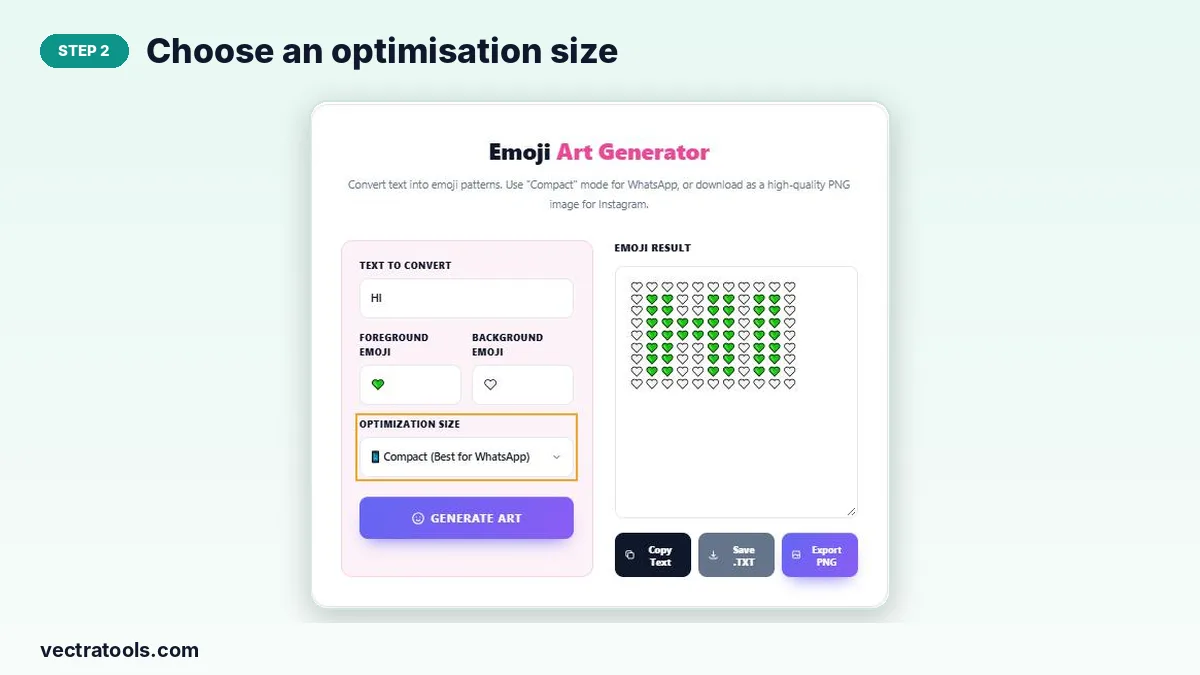
Step 2: Choose an Optimisation Size
Open Optimization Size and choose Compact for WhatsApp chats, Standard for social posts or Large for detailed art on bigger screens.
Step 3: Generate the Emoji Art
Click Generate Art. The Emoji Result box fills with your word drawn in emoji, row by row, ready to check before you share it.

Step 4: Copy, Save as .TXT or Export PNG
Click Copy Text to paste the art into a chat, Save .TXT to keep a text file, or Export PNG to download an image that looks the same on every device.

Which Size Should You Use?
Chat apps wrap long lines, which can break the shape of your emoji art. The size option controls how wide each letter is, so the art fits the screen it will be viewed on.
- Compact: narrow letters that fit most phone screens in WhatsApp and Telegram.
- Standard: a balance of detail and width for Instagram, Facebook and X captions.
- Large: wide, detailed letters for desktop chats, Discord or a PNG export.
Why Use an Emoji Art Generator?
Drawing letters with emojis by hand means counting every heart on every row. An emoji art generator does the counting for you and gives a neat, even result in one click.
- Make birthday, Eid, wedding and anniversary greetings that stand out in a chat.
- Create eye-catching text for Instagram stories or status updates.
- Export a PNG when you need the emoji art generator result to look identical on Android and iPhone.
- Free to use as often as you like.
Tips for Better Emoji Art
- Pick two emojis with strong contrast, such as a dark heart on a white heart.
- Keep words short; long words wrap on phones even in Compact mode.
- Use Export PNG for apps that change emoji designs, so the art keeps its shape.
- Preview the copied text in a chat with yourself before sending it to a group.
Frequently Asked Questions
Is this emoji art generator free?
Yes. It is free with no sign-up and no limit on how many designs you make.
Will the emoji art work in WhatsApp?
Yes. Use the Compact size, click Copy Text and paste the art into any WhatsApp chat.
Can I download the emoji art as an image?
Yes. Click Export PNG to save the art as a PNG image.
Which emojis can I use?
Any single emoji works for the foreground and background, such as hearts, stars, fire or flowers.
Why does my emoji art look broken on my phone?
Long words wrap on narrow screens. Use a shorter word or the Compact size, or share it as a PNG.
Is my text uploaded anywhere?
No. The emoji art is created in your browser and nothing is sent to a server.