

Eisenhower Priority Matrix – Sort Tasks by Urgency and Importance
Eisenhower Matrix
Sort your tasks by Urgency and Importance with this Eisenhower priority matrix. Add new tasks using the controls below, or simply drag and drop them between quadrants.

Quick answer
Type a task, choose Urgent or Not Urgent and Important or Not Important, then press Add Task. The Eisenhower priority matrix places it in one of four quadrants: 1. Do First (urgent and important), 2. Schedule (important, not urgent), 3. Delegate (urgent, not important) or 4. Eliminate (neither). Drag tasks between quadrants, tick them when done and print the matrix.
The Eisenhower Matrix, named after US President Dwight D. Eisenhower, separates what is urgent from what is important. Most people spend their day on urgent tasks; the matrix helps you protect time for important work before it becomes a crisis.
This Eisenhower priority matrix makes the method practical. Two quick toggles decide where each task goes, the four colour-coded quadrants show your priorities at a glance, and the board is saved in your browser.
The Four Quadrants
| Quadrant | Urgent? | Important? | What to do | Example |
|---|---|---|---|---|
| 1. Do First | Yes | Yes | Do it today | Fix checkout bug on live site |
| 2. Schedule | No | Yes | Put a time in your calendar | Plan next quarter goals |
| 3. Delegate | Yes | No | Hand it to someone else or batch it | Book meeting room |
| 4. Eliminate | No | No | Drop it or limit it | Scroll social media |
How to Use the Eisenhower Priority Matrix
Brain-dump everything on your plate first, then sort each task honestly.
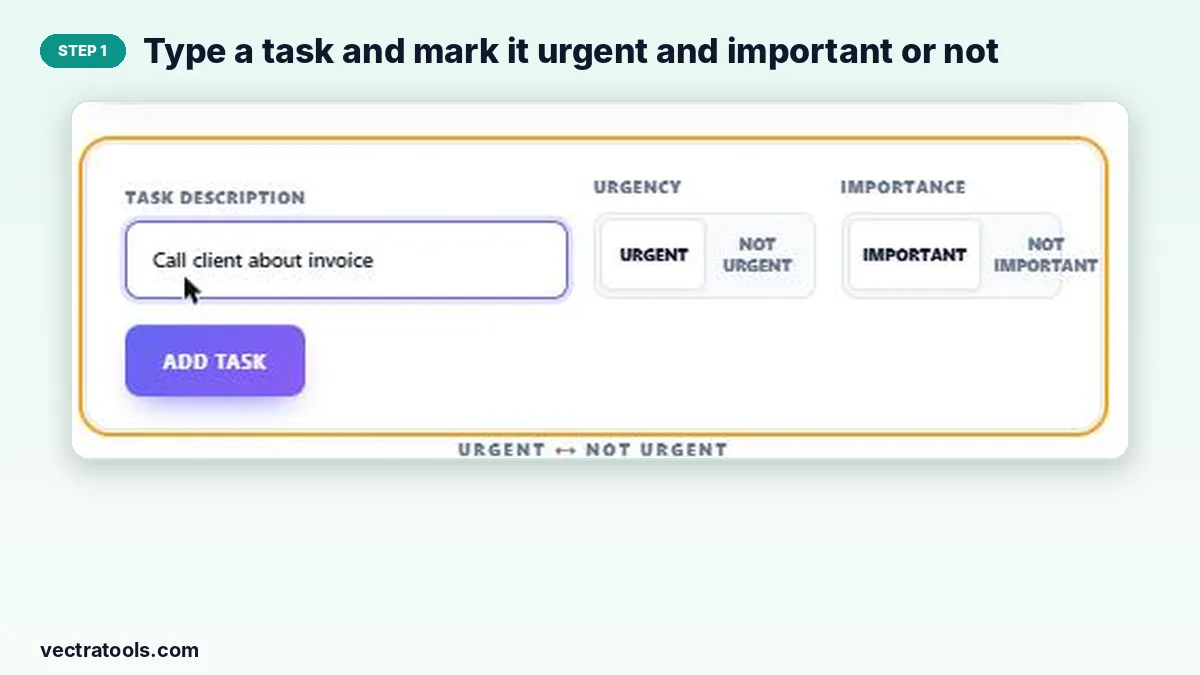
Step 1: Type a task and mark it urgent and important or not
Write the task in Task Description, then click Urgent or Not Urgent and Important or Not Important. The selected options are highlighted.
Step 2: The task lands in the right quadrant; drag to move it
Press Add Task and the task appears in Do First, Schedule, Delegate or Eliminate. If your view changes, drag the task into another quadrant.

Step 3: Tick finished tasks, then print the matrix
Tick a task’s box when it is done and it is crossed out. Print Matrix gives you a paper copy for the week; Reset Matrix clears the board.

How to Get the Most from the Matrix
- Start each day with quadrant 1, but block time for quadrant 2: that is where long-term progress happens.
- If quadrant 1 is always full, many tasks probably belonged in quadrant 2 and were left too late.
- Be strict with quadrant 4. Deleting tasks is a valid choice.
- Review the matrix weekly and move tasks as deadlines approach.
Why Use an Online Eisenhower Priority Matrix
Drawing the grid on paper works once, but tasks move between quadrants as deadlines approach. An online Eisenhower priority matrix lets you drag tasks as things change and keeps the board saved between sessions. Use this Eisenhower priority matrix every Monday to plan the week, then glance at it each morning to choose what to do first.
Frequently Asked Questions
What is the Eisenhower priority matrix?
A 2×2 grid that sorts tasks by urgency and importance into Do First, Schedule, Delegate and Eliminate.
What is the difference between urgent and important?
Urgent tasks demand attention now, often because of a deadline or another person. Important tasks contribute to your long-term goals and values. A task can be one, both or neither.
Can I move a task to another quadrant?
Yes. Drag it with your mouse into the quadrant where it belongs.
Is my matrix saved?
Yes. Tasks are stored in your browser and reload when you return on the same device.
What if I have no one to delegate to?
Batch quadrant 3 tasks into one short block of time, or look for ways to automate or simplify them.
Is it free?
Yes, the Eisenhower priority matrix is free and needs no account.