

Decision Matrix Tool Online – Weighted Scoring for Better Choices
Decision Matrix Tool
Evaluate your options objectively. Add your choices, define criteria, assign importance weights, and let math decide the best outcome.

Quick answer
Add each option as a row and each criterion as a column, give every criterion an importance weight from 1 to 5, then score each option from 1 to 5 on each criterion. The decision matrix tool multiplies each score by its weight, adds them up into a grand total and highlights the option with the highest total in green.
When choices have several pros and cons, it is easy to be swayed by one feature or a gut feeling. A weighted decision matrix forces you to decide what matters most and then compare every option on the same terms.
This decision matrix tool gives you an editable grid: options down the side, criteria across the top, weights in their own row and a live grand total for each option. Add or remove rows and columns as you go.
How the Weighted Score Is Calculated
Grand total = Σ (score × weight) across all criteria.
| Option | Price (w3) | Performance (w5) | Battery life (w4) | Grand total |
|---|---|---|---|---|
| Laptop A | 4 × 3 = 12 | 3 × 5 = 15 | 3 × 4 = 12 | 39 |
| Laptop B | 2 × 3 = 6 | 5 × 5 = 25 | 4 × 4 = 16 | 47 |
| Laptop C | 3 × 3 = 9 | 4 × 5 = 20 | 5 × 4 = 20 | 49 ✓ |
Laptop B has the best performance, but Laptop C wins overall because it scores well on all three criteria, including battery life, which was weighted highly.
How to Use the Decision Matrix Tool
Decide your criteria before you score, so your favourite option does not shape the criteria.
Step 1: Add your options as rows and criteria as columns
Use + Add Option (Row) for each choice and + Add Criterion (Col) for each factor that matters, then type their names into the grid. × removes a row or column; Reset Grid starts again.

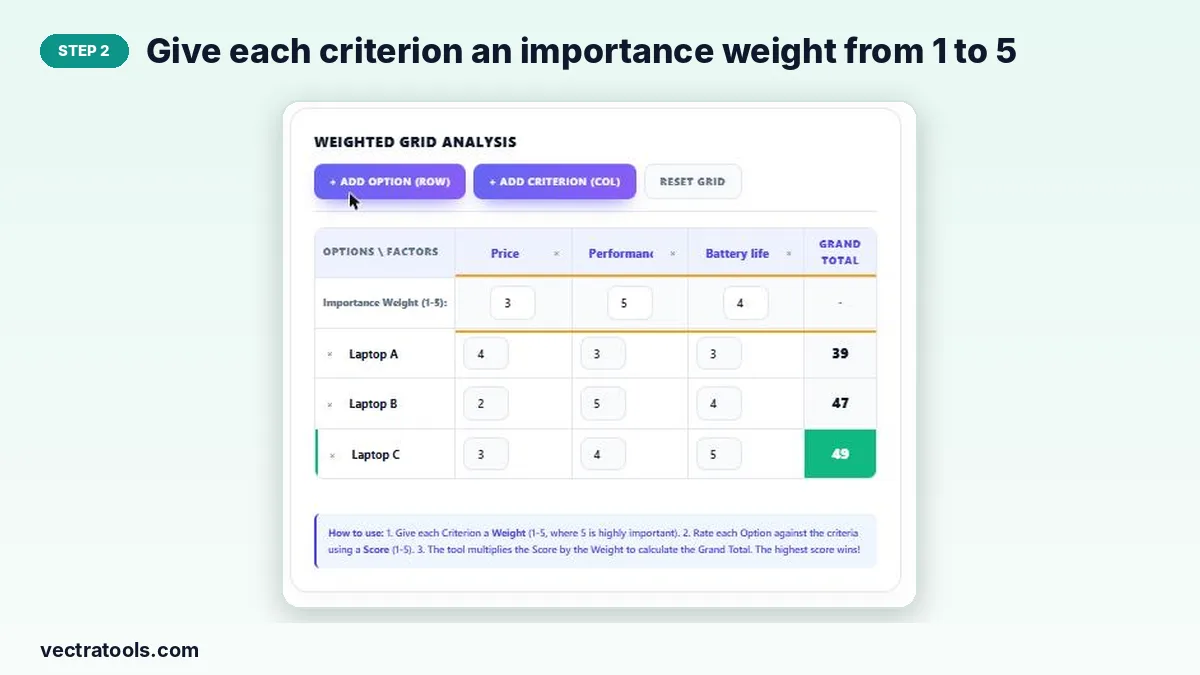
Step 2: Give each criterion an importance weight from 1 to 5
In the Importance Weight row, enter 5 for criteria that matter most and 1 for those that matter least.
Step 3: Score every option against each criterion
In each option’s row, score it from 1 (poor) to 5 (excellent) for every criterion. Be consistent: 5 for price should mean “best price”, i.e. cheapest.

Step 4: The highest grand total wins
The Grand Total column updates as you type and the option with the highest weighted total is highlighted in green.

Tips for an Honest Decision Matrix
- Keep it to 3–7 criteria; too many dilute the important ones.
- Use the full 1–5 range for scores so differences show up.
- If two options are within a few points, look again at the weights or add a missing criterion.
- If the winner feels wrong, ask why. It often reveals a criterion you forgot.
When to Use a Decision Matrix
- Choosing between job offers, apartments or cars.
- Selecting a supplier, software tool or hiring candidate.
- Prioritising project ideas against cost, impact and effort.
Why Use an Online Decision Matrix Tool
A spreadsheet can do the same maths, but setting up formulas takes time. A decision matrix tool is ready instantly, recalculates as you type and highlights the winner for you. Use this decision matrix tool on your own or share your screen in a meeting so the whole team can agree on weights and scores together.
Frequently Asked Questions
What is a weighted decision matrix?
A grid that scores each option on several criteria, multiplies each score by how important that criterion is, and adds the results so options can be compared fairly.
What scale should I use for scores and weights?
The tool uses 1 to 5 for both: 1 is low or poor, 5 is high or excellent.
Can I add more options or criteria?
Yes. Press + Add Option (Row) or + Add Criterion (Col) as many times as you need.
Is my matrix saved?
Yes. The grid is stored in your browser and reloads when you come back on the same device.
What if two options tie?
Review the weights or add another criterion that separates them, such as risk or long-term value.
Is the decision matrix tool free?
Yes. It is free and needs no account.