

Crossword Puzzle Maker – Build Printable Crosswords from Your Words
Crossword Puzzle Maker
Enter your vocabulary words and clues below. Our engine automatically generates a printable worksheet grid for students and learners.

Quick answer
To make a crossword, type one entry per line in the format WORD : clue, add a worksheet title and press Generate Crossword. The crossword puzzle maker interlocks the words into a grid, numbers them and splits the clues into Across and Down. Tick “Show Answer Key” to check the letters, then press Print Worksheet.
Crosswords make students recall a word from its meaning, which is why teachers use them for vocabulary, science terms and revision. They also make good newsletter fillers and party games.
This free crossword puzzle maker does the hard part for you: fitting the words together. You write the words and clues, and it builds a connected grid, numbers every entry and lays out the clue lists ready to print.
How the Crossword Generator Works
- Every line with a colon is read as WORD : clue. Spaces, numbers and punctuation in the word are removed and letters are turned into capitals.
- Words are sorted from longest to shortest and the longest one goes in first.
- Each next word is placed where it crosses an existing word on a matching letter, choosing the spot with the most crossings. Words may not touch side by side, so every white square belongs to a real entry.
- If a word cannot be fitted, the generator reshuffles the order and tries again, up to 80 layouts, before reporting the word as unplaced.
The finished grid is trimmed to the space it needs, numbered from top-left, and the clues are listed under Across and Down.
How to Use the Crossword Puzzle Maker
You need at least two words with clues. Five to fifteen entries make a good classroom crossword.
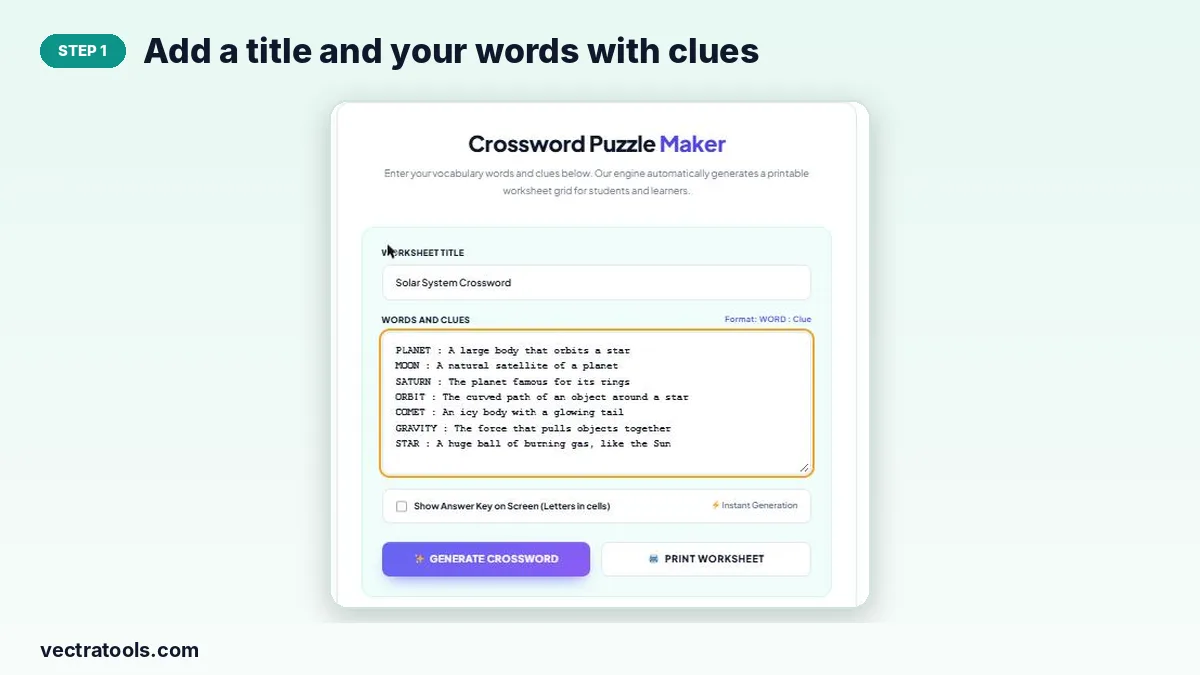
Step 1: Add a title and your words with clues
Type a worksheet title, then enter one entry per line as WORD : clue, for example “ORBIT : The curved path of an object around a star”.
Step 2: Press Generate Crossword
Click Generate Crossword. The tool fits the words into an interlocking grid in a moment. Press it again any time you change the list.
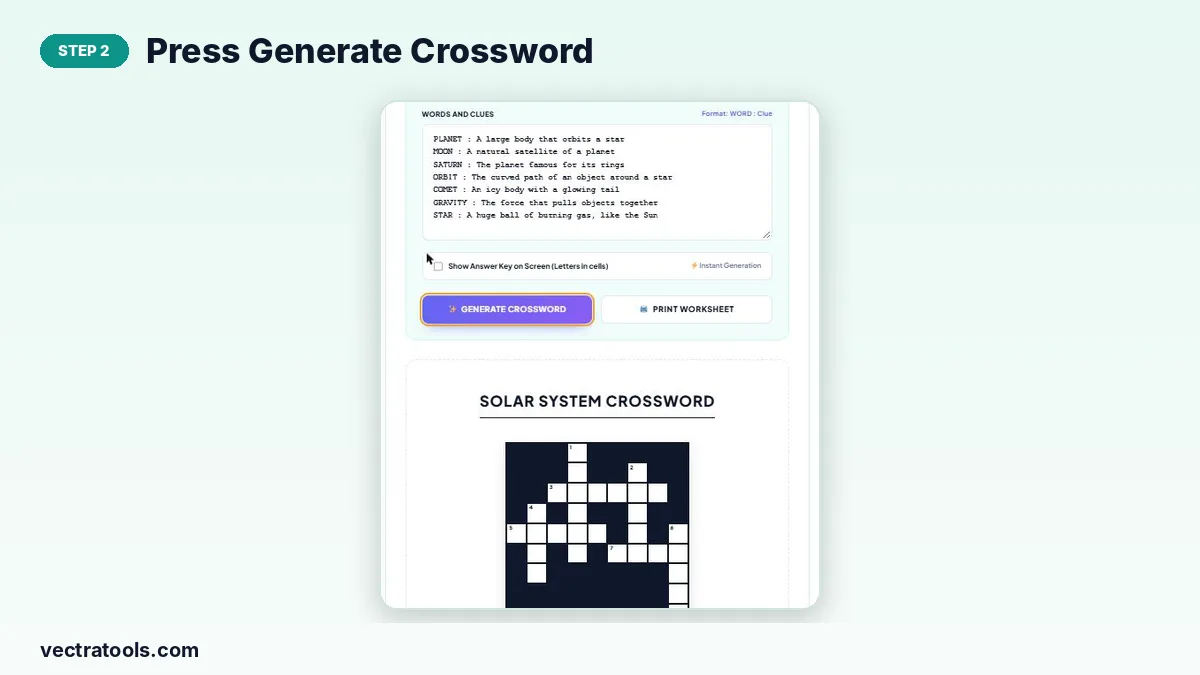
Step 3: Check the blank grid and numbered clues
The grid appears with numbered white squares, and the clues are split into Across and Down lists. If a word could not be placed, a notice names it so you can change it or add a word that shares more letters.

Step 4: Show the answer key, then print the worksheet
Tick “Show Answer Key on Screen” to fill the letters in and check the puzzle. Untick it and press Print Worksheet for a clean student copy, or print with the key on for your answer sheet.

Tips for Writing Good Clues
- Keep each clue short and match the word form: a plural clue for a plural answer.
- Mix definitions with fill-in-the-blank clues such as “The red ___ is Mars”.
- Choose words that share common letters (E, A, R, S, T). Words full of rare letters like Q or Z are harder to cross.
- Avoid one- or two-letter words; the tool needs at least two letters and short words give weak crossings.
Ideas for Classroom Crosswords
| Subject | Example entries |
|---|---|
| Science | ATOM, CELL, ENERGY, GRAVITY |
| Geography | RIVER, DESERT, ISLAND, CAPITAL |
| English | NOUN, VERB, ADJECTIVE, SYNONYM |
| History | EMPIRE, TREATY, REVOLUTION |
| Languages | Words in the target language with clues in your own language |
Why Use an Online Crossword Puzzle Maker
Fitting words into a crossword by hand can take an hour of rubbing out. A crossword puzzle maker tries every crossing for you in a fraction of a second and always produces a connected grid with correct numbering. Because the crossword puzzle maker reshuffles the word order whenever a word will not fit, it rarely leaves an entry out.
Use this crossword puzzle maker for weekly vocabulary, end-of-unit revision, homework sheets and fun activities for clubs or family events.
Bookmark the crossword puzzle maker and build a new crossword each week from the words your class is learning.
Frequently Asked Questions
Is this crossword puzzle maker free?
Yes. You can create and print as many crosswords as you want without signing up.
What format should I use for words and clues?
One entry per line: the word, a colon, then the clue. For example, “MOON : A natural satellite of a planet”.
Why does it say a word could not fit?
The word could not cross any placed word on a matching letter without touching other words, even after many tries. Change the word, add words that share its letters, or remove it.
Can I print an answer key?
Yes. Tick “Show Answer Key on Screen” and print to get a copy with all letters filled in.
Can I use phrases with spaces?
Yes, but spaces are removed, so “black hole” becomes BLACKHOLE. Mention the letter count in the clue if that helps.
How many words can I add?
There is no fixed limit, but 5–20 words give the most readable puzzles.