

URL Defanger Online – Defang and Refang Malicious Links Safely
URL Defanger
Use this free URL defanger online to turn malicious URLs and IP addresses into a safe, unclickable format for sharing.

Quick answer
To use this URL defanger online, paste one or more URLs, IP addresses or email addresses into the box, one per line. The tool instantly rewrites them in a safe format: http becomes hxxp, :// becomes [://] and dots become [.], so links cannot be clicked by accident. Tick Defang Emails to also change @ to [@]. Use the Refang tab to turn defanged indicators back into normal links.
Security analysts, SOC teams and IT staff constantly share suspicious links in tickets, emails and chat. If a phishing URL stays clickable, someone can open it by mistake, and many apps automatically turn URLs into live links or previews. This free URL defanger online neutralises those indicators of compromise (IOCs) in bulk, using the conventions most threat intelligence teams already recognise.
It works both ways: defang to share safely, refang when you need to load indicators into a sandbox, block list or analysis tool. Everything runs in your browser, so sensitive IOCs are not sent anywhere.
URL Defanger Online Features
| Feature | How it works |
|---|---|
| Bulk defanging | Process many URLs, IPs and emails at once, one per line |
| Standard notation | hxxp/hxxps, [://] and [.] used by most threat intel platforms |
| Email defanging | Optional @ to [@] conversion |
| Choose what to change | Toggle protocol, slashes, dots and emails separately |
| Refang mode | Convert hxxp, [.], (.) and [://] back to normal links |
| Live output | Results update as you type or paste |
| Copy and clear | Copy the whole result in one click |
| Private | Runs locally; IOCs never leave your browser |
How to Use the URL Defanger Online
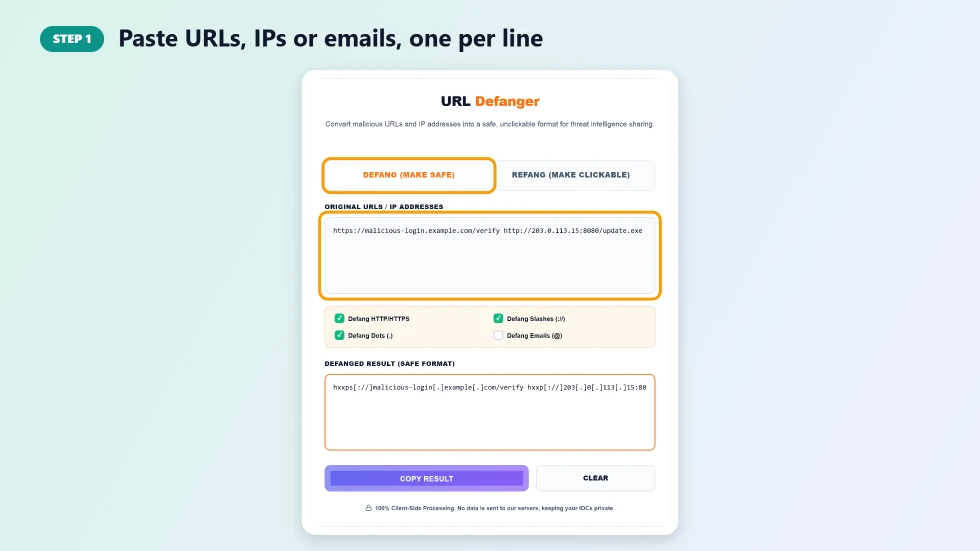
Step 1: Paste URLs, IPs or emails, one per line
On the Defang (Make Safe) tab, paste the indicators into Original URLs / IP Addresses. You can paste a whole list from a log, alert or email header, one item per line.
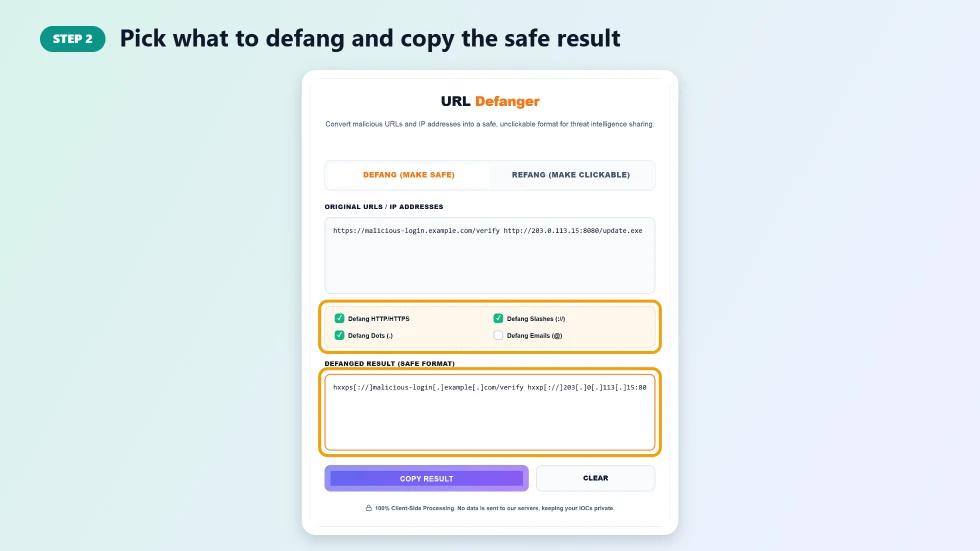
Step 2: Pick what to defang and copy the safe result
Use the checkboxes to choose what is changed: Defang HTTP/HTTPS, Defang Slashes, Defang Dots and Defang Emails. The safe version appears in Defanged Result as you type. Press Copy Result and paste it into your ticket, report or chat.
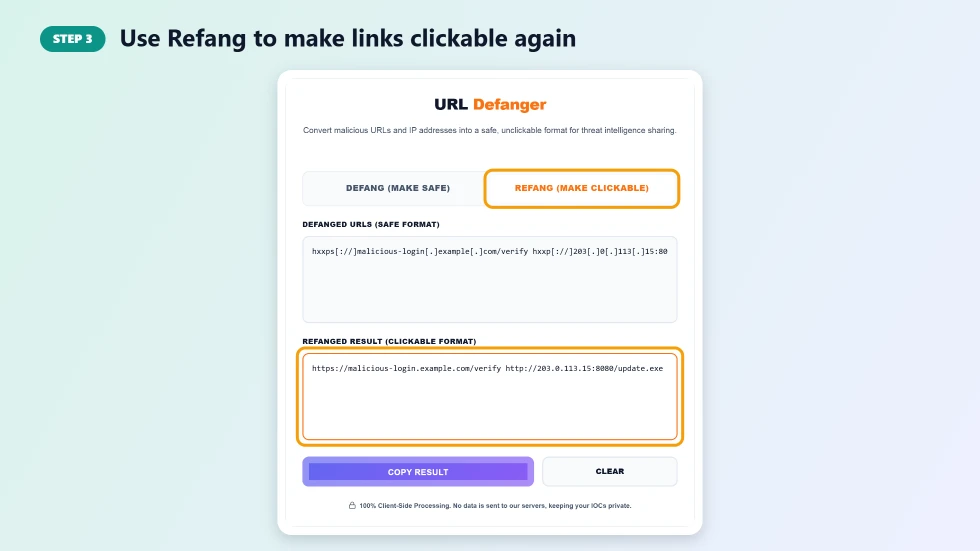
Step 3: Use Refang to make links clickable again
When you need the real indicators, for example to add them to a firewall block list, click Refang (Make Clickable) and paste the defanged text. The tool restores the original URLs, IPs and emails. Only open refanged links in a safe, isolated environment.
Why Defang URLs?
- Prevent accidental clicks: defanged links cannot be opened by mistake.
- Stop auto-linking: email clients, Slack and Teams will not turn them into live links or previews.
- Avoid security filters: reports containing live malicious URLs can be blocked or quarantined.
- Professional standard: threat intelligence reports and SOC playbooks expect defanged IOCs.
Common Defang Formats
The most widely used style replaces http with hxxp, wraps the scheme separator as [://] and puts dots in square brackets, for example hxxps[://]evil[.]example[.]com. Some teams use (.) or {.} instead of [.], or [at] for email addresses. The refang mode of this URL defanger online understands both [.] and (.) styles.
URL Defanger Online Tips
- Defang indicators before pasting them into any ticket, email or chat.
- Keep the original list in a secure location if you will need to refang it later.
- Never refang and open a malicious link on your everyday computer; use a sandbox or isolated VM.
- Defanged text can still be searched, so you can paste it into your threat intel platform's search box.
Frequently Asked Questions
Is this URL defanger online free?
Yes. It is free with no sign-up and no limit on how many indicators you process.
What does defang mean?
Defanging rewrites a URL, IP or email so it is no longer clickable, for example changing http to hxxp and . to [.].
Can I defang many URLs at once?
Yes. Paste a list with one URL, IP or email per line and all of them are defanged together.
How do I refang a URL?
Switch to the Refang (Make Clickable) tab and paste the defanged text. The original links are restored.
Is my data sent to a server?
No. Defanging and refanging run entirely in your browser.
Does defanging make a malicious site safe?
No. It only stops the link being opened by accident. The site itself is still dangerous, so never visit it outside a secure environment.