

What Is My IP Address? See Your Public IP, ISP and Location
What is My IP Address?
What is my IP address? This free tool instantly shows your public IP address, Internet Service Provider (ISP) and approximate location.

Quick answer
What is my IP address? Just open this page: your public IP address appears at the top within a second or two. Below it you will see your internet provider (ISP), city, region, country, postal code and timezone, plus a map of the approximate network location. Press Copy IP to copy the address. The location is based on your ISP's network, so it is usually accurate to the city, not your exact street.
Your public IP address is the number the rest of the internet sees when you visit a website, play an online game or connect to a server. You might need it to set up remote access, whitelist your connection in a firewall, troubleshoot a network or check whether a VPN is working. This free what is my IP address tool shows it instantly, along with your provider and approximate location.
The page looks up your connection with a public IP geolocation service, with a second service as a backup if the first does not respond. Nothing is stored by VectraTools. The screenshots on this page use a sample documentation IP address, not a real visitor's.
What Is My IP Address Features
| Feature | How it works |
|---|---|
| Instant IP detection | Shows your public IPv4 or IPv6 address as soon as the page loads |
| ISP name | Displays the internet service provider that owns the address |
| Approximate location | City, region, country and postal code |
| Timezone | Shows the timezone of the network location |
| Interactive map | Plots the approximate network location on an OpenStreetMap map |
| Dual fallback | Uses a second lookup service if the first one is unavailable |
| Copy IP button | Copy the address to your clipboard in one click |
| No sign-up | Free to use, with nothing saved by VectraTools |
How to Use the What Is My IP Address
Step 1: Open the page and see your public IP
As soon as the page loads, the tool detects the public IP address of your connection and shows it in large text at the top. If you are on a VPN or proxy, you will see the VPN server's address instead of your home connection.

Step 2: Check your ISP, city, region and timezone
Under the IP address, the detail cards show your Internet Provider, City, Region / State, Country, Postal / ZIP Code and Timezone. Further down, a map marks the approximate network location. These details come from IP geolocation databases and describe where your provider routes traffic.

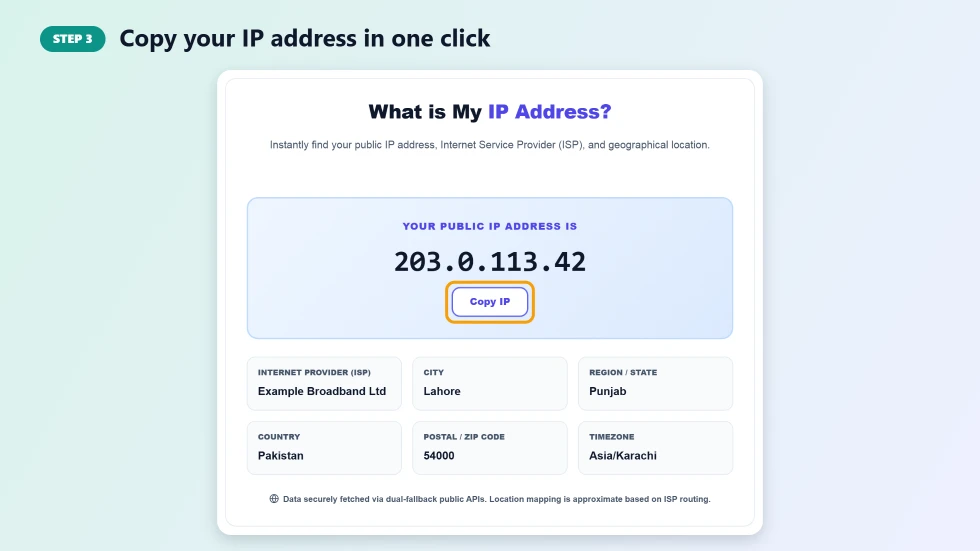
Step 3: Copy your IP address in one click
Press Copy IP to put the address on your clipboard, ready to paste into router settings, a firewall whitelist, a support ticket or a game server configuration.
Public vs Private IP Address
- Public IP: assigned by your ISP and visible to websites. This is what the tool shows.
- Private IP: used inside your home or office network, such as 192.168.1.10. Websites cannot see it.
- IPv4: four numbers separated by dots, for example 203.0.113.42.
- IPv6: a longer address written in hexadecimal with colons, increasingly common on mobile networks.
Why Your IP Location May Look Wrong
IP geolocation shows where your provider's network equipment is registered, not your exact address. Mobile data, satellite internet and large ISPs often route traffic through a regional hub, so the city shown can be a nearby or even a different city. VPNs and proxies will show the location of the VPN server instead.
Common Reasons to Check Your IP Address
- Setting up port forwarding, remote desktop or a home server.
- Whitelisting your connection on a website, database or firewall.
- Confirming that a VPN or proxy is hiding your real address.
- Giving your IP to tech support to troubleshoot a connection problem.
- Checking whether your ISP has changed your dynamic IP address.
Frequently Asked Questions
What is my IP address?
It is the public address your internet connection uses to talk to websites. Open this page and it is shown at the top, along with your ISP and approximate location.
Is IP geolocation accurate?
It is usually accurate to the country and often to the city, but it does not show your street or house. Mobile and VPN connections can show a different city.
Can someone find my home address from my IP?
Not from public tools like this one. Only your ISP can link an IP address to a subscriber, usually only with a legal request.
Why does my IP address change?
Most home and mobile connections use dynamic IPs, which the provider can change when your router restarts or after a set period.
How do I hide my IP address?
Use a reputable VPN or the Tor browser. Websites will then see the VPN or Tor exit address instead of your own.
Does VectraTools store my IP?
No. The lookup happens in your browser through a public geolocation service, and VectraTools does not save the result.