

Hash Generator Online – MD5, SHA-1, SHA-256 and SHA-512 at Once
Hash Generator
Use this free hash generator online to turn text into MD5, SHA-1, SHA-256 and SHA-512 hashes instantly. Computations are performed locally in your browser for absolute privacy.

Quick answer
To use this hash generator online, type or paste text into the Input Text box. The tool instantly shows four hashes of that text: MD5 (32 hex characters), SHA-1 (40), SHA-256 (64) and SHA-512 (128). Tick Uppercase Hashes if you need capital letters, then press Copy next to the hash you want. The text is hashed as UTF-8 inside your browser and is never uploaded.
A hash is a fixed-length fingerprint of some data. Change one letter of the input and the hash changes completely, which makes hashes useful for checking file integrity, comparing values without revealing them and building cache keys. This free hash generator online calculates the four most common algorithms at the same time, so you do not have to switch between tools.
I tested the output against the browser's own Web Crypto API to make sure the results match standard implementations, including text with accents and other non-English characters. Everything happens on your device, so it is safe to hash sensitive strings.
Hash Generator Online Features
| Feature | How it works |
|---|---|
| Four algorithms at once | MD5, SHA-1, SHA-256 and SHA-512 shown side by side |
| Live hashing | Hashes update as you type, with a character counter |
| UTF-8 input | Accented letters, emoji and non-Latin scripts are hashed correctly |
| Uppercase option | Switch every hash to capital hex letters in one click |
| One-click copy | A Copy button next to each hash |
| Standard output | Hex-encoded results that match common libraries and command-line tools |
| Empty-string values | Shows the well-known hashes of an empty input, useful for testing |
| Private | Runs locally; your text is never sent to a server |
How to Use the Hash Generator Online
Step 1: Type or paste the text to hash
Click the Input Text box and type or paste anything: a word, a sentence, a JSON string or a password you want to compare. The character counter shows how long the input is. Remember that spaces and line breaks count, so trailing spaces change the hash.

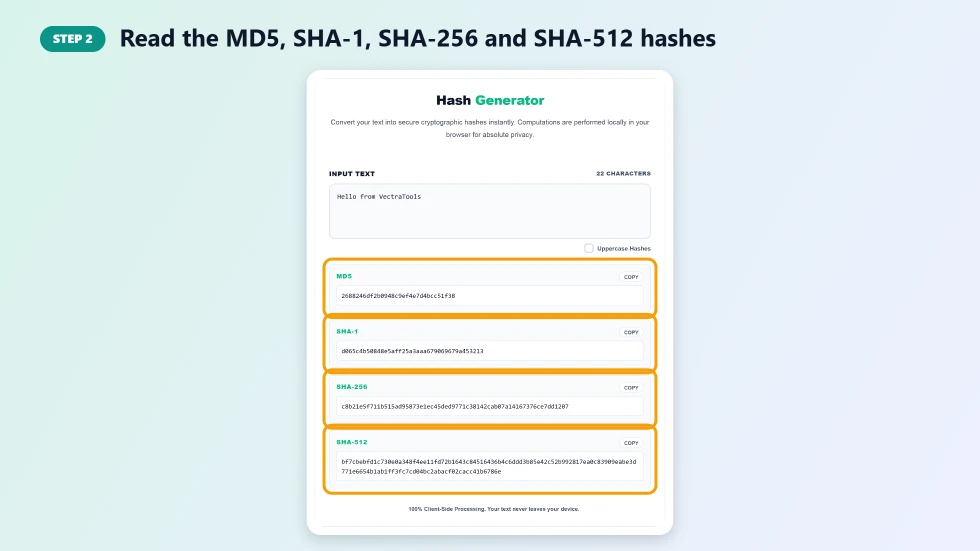
Step 2: Read the MD5, SHA-1, SHA-256 and SHA-512 hashes
Four result cards update as you type. MD5 gives 32 hexadecimal characters, SHA-1 gives 40, SHA-256 gives 64 and SHA-512 gives 128. Use SHA-256 or SHA-512 for anything security-related, and MD5 or SHA-1 only for checksums and legacy systems.
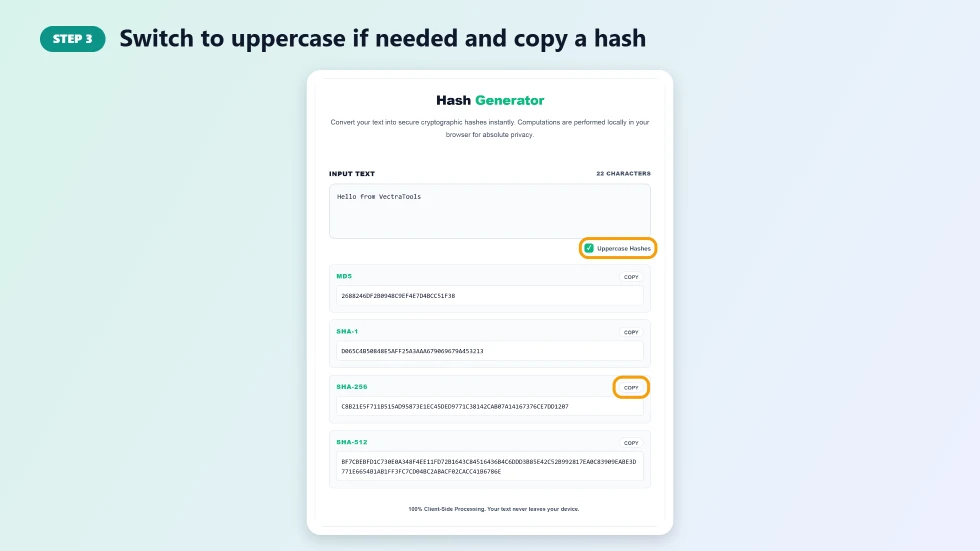
Step 3: Switch to uppercase if needed and copy a hash
Tick Uppercase Hashes if the system you are comparing against uses capital letters. Then press Copy on the card you need and paste the hash wherever you want it.
Which Hash Algorithm Should You Use?
- MD5: fast and widely supported, but broken for security. Fine for quick checksums and cache keys.
- SHA-1: also considered weak against collisions. Still seen in older systems and Git object IDs.
- SHA-256: the modern default for integrity checks, digital signatures and blockchain.
- SHA-512: a longer SHA-2 hash, often faster on 64-bit systems and used where extra length is wanted.
Common Uses for a Hash Generator Online
- Verifying that a downloaded file or message has not been changed.
- Comparing two pieces of text without storing the originals.
- Creating cache keys, ETags or unique IDs from content.
- Checking API signatures and webhook payloads while debugging.
- Learning how hashing works in computer science and security courses.
Hashing Is Not Encryption
A hash cannot be reversed to get the original text, while encrypted data can be decrypted with the right key. That is why hashes are used to check values rather than to hide them. For storing user passwords, plain MD5 or SHA hashes are not enough; use a slow, salted algorithm such as bcrypt or Argon2 instead.
Frequently Asked Questions
Is this hash generator online free?
Yes. It is free, needs no sign-up and has no limit on how much text you hash.
Is my text sent to a server?
No. All hashing happens in your browser, so your text never leaves your device.
Can a hash be decrypted?
No. Hash functions are one-way. You can only check a guess by hashing it and comparing the result.
Why does my hash not match another tool?
The most common causes are extra spaces, a trailing line break, different letter case in the input or a different text encoding. This tool hashes the exact text as UTF-8.
Which algorithm is the most secure?
Of the four, SHA-512 and SHA-256 are secure for integrity checks. MD5 and SHA-1 are broken for security purposes.
Should I use SHA-256 to store passwords?
No. Use a slow, salted password hashing algorithm such as bcrypt or Argon2. Fast hashes like SHA-256 are too easy to brute force for passwords.