

CSV Formatter – Clean, Validate and Beautify CSV Data in 3 Easy Steps
CSV Formatter
Paste or upload CSV data to clean it, fix spacing and quotes, change the delimiter, find broken rows and download a tidy file. Runs fully in your browser.
Use this free CSV formatter to clean messy comma-separated data, fix quotes and spacing, change the delimiter and spot broken rows before you import the file anywhere.
Quick answer
A CSV formatter reads raw CSV text, splits it into rows and fields using the delimiter (comma, semicolon, tab or pipe), cleans each value and writes it back out with consistent quoting and line endings. Paste your data above, click Format CSV, and the tool trims extra spaces, removes empty or duplicate rows, quotes values that contain commas, and lists any row whose field count does not match the header. Everything runs in your browser, so your file is never uploaded.
Table of Contents
CSV is the most common way to move tables between spreadsheets, databases, CRMs and code. It is also easy to break: an extra space before a value, a comma inside an address, a blank line at the end, or an Excel export that uses semicolons instead of commas. Any of these can make an import fail or put data in the wrong column.
This CSV formatter fixes those problems in one pass. It auto-detects the delimiter, follows the standard CSV quoting rules (RFC 4180), and shows you a table preview so you can see exactly what each column will contain before you copy or download the result.
What the CSV Formatter Does
| Feature | What it fixes |
|---|---|
| Auto-detect delimiter | Reads comma, semicolon, tab and pipe files without you choosing first |
| Trim spaces | Removes spaces before and after values, such as " Lahore " to "Lahore" |
| Remove empty rows | Deletes blank lines that create empty records on import |
| Remove duplicate rows | Keeps the first copy of each identical row and drops the rest |
| Fix short rows | Adds empty cells so every row matches the header width |
| Smart quoting | Quotes only values that need it, every value, or text values only |
| Header cleanup | Keeps headers, cleans spaces, or converts them to snake_case or Title Case |
| Delimiter change | Converts CSV to semicolon, tab (TSV) or pipe-separated output |
| Validation | Lists every row with the wrong number of fields and highlights it in red |
How to Use the CSV Formatter
Formatting a file takes three short steps. You do not need an account, and large files are processed on your own device.
Step 1: Paste or Upload Your CSV Data
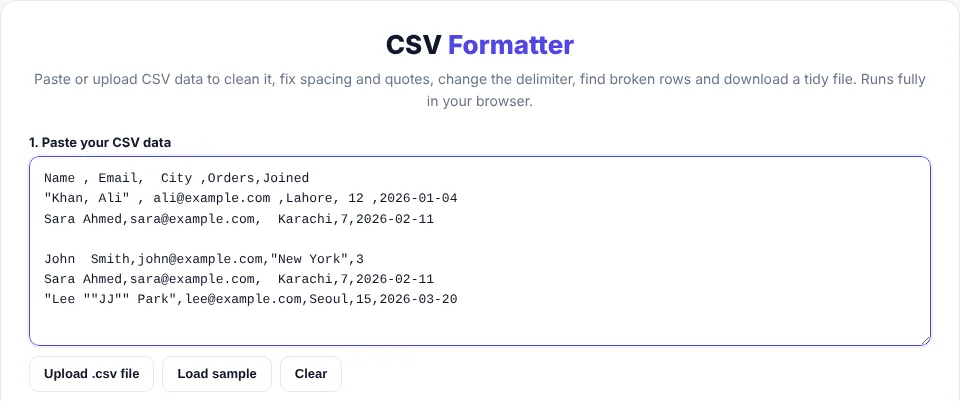
Paste your CSV text into the Paste your CSV data box, or click Upload .csv file to load a .csv, .tsv or .txt file from your computer. Click Load sample if you want to try the tool with a messy example first.
Step 2: Choose Your Formatting Options
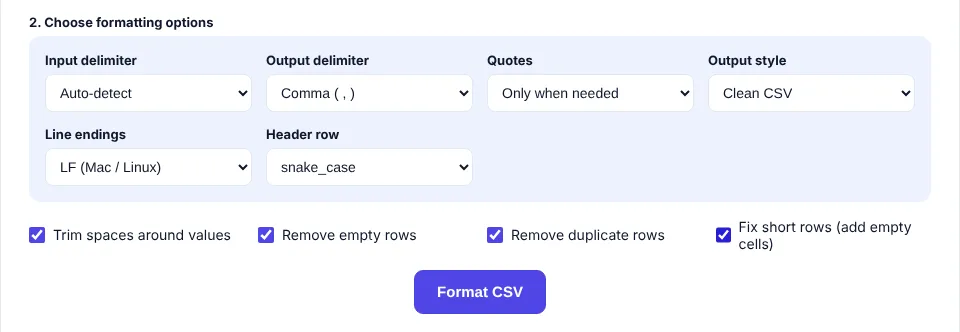
Leave Input delimiter on Auto-detect unless the result looks wrong. Pick the Output delimiter, how values should be quoted, the line endings and how the header row should look. Then tick the cleanup options you need, such as Trim spaces, Remove empty rows, Remove duplicate rows or Fix short rows, and click Format CSV.
Step 3: Check the Results and Copy or Download
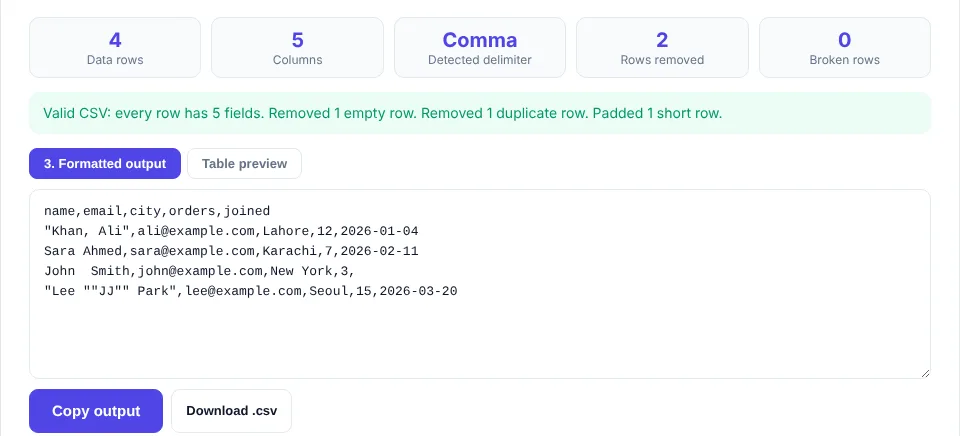
The summary shows the number of data rows, columns, the delimiter that was detected, rows removed and broken rows. A green message means every row has the same number of fields. Open Table preview to check each column, then click Copy output or Download .csv. Changing any option updates the output instantly.
CSV Formatting Rules the Tool Follows
There is no single official CSV format, but most software follows the rules in RFC 4180. The formatter uses them when it reads and writes your data:
- Each record is on its own line, and every record should have the same number of fields as the header.
- A field that contains the delimiter, a double quote or a line break must be wrapped in double quotes.
- A double quote inside a quoted field is written twice, so
Lee "JJ" Parkbecomes"Lee ""JJ"" Park". - Spaces are part of the value, so
, Lahore,is not the same as,Lahore,unless you trim them. - The first row is usually the header and names each column.
Before and After Example
Here is the sample data from the tool before formatting. It has spaces around values, a blank line, a duplicate record and a row with a missing value:
Name , Email,  City ,Orders,Joined
"Khan, Ali" , [email protected] ,Lahore, 12 ,2026-01-04
Sara Ahmed,[email protected],  Karachi,7,2026-02-11

John  Smith,[email protected],"New York",3
Sara Ahmed,[email protected],  Karachi,7,2026-02-11
With Trim spaces, Remove empty rows, Remove duplicate rows, Fix short rows and a snake_case header, the CSV formatter returns:
name,email,city,orders,joined
"Khan, Ali",[email protected],Lahore,12,2026-01-04
Sara Ahmed,[email protected],Karachi,7,2026-02-11
John  Smith,[email protected],New York,3,
Notice that "Khan, Ali" keeps its quotes because the value contains a comma, while "New York" loses them because they are not needed. The short John Smith row gets an empty last cell so it lines up with the header.
Comma, Semicolon, Tab or Pipe: Which Delimiter to Use
| Delimiter | Best for | Watch out for |
|---|---|---|
| Comma ( , ) | Most apps, Google Sheets, databases, APIs | Values with commas must be quoted |
| Semicolon ( ; ) | Excel in regions that use a comma as the decimal mark | Some US tools expect commas only |
| Tab (TSV) | Copying into spreadsheets, data with many commas | Tabs are invisible and easy to break by hand |
| Pipe ( | ) | Log files and legacy system exports | Less common, may need a manual import setting |
If Excel opens your file with everything in one column, the delimiter does not match your system settings. Format it again with a semicolon or comma output and re-open it.
Common CSV Problems and How to Fix Them
- Data shifts into the wrong column: a value contains the delimiter but is not quoted. Keep quoting on "Only when needed" or "Quote every field".
- "Row has 4 fields, expected 5": a value is missing. Fix it at the source, or tick Fix short rows to add an empty cell.
- Extra rows with no data: blank lines at the end or middle of the file. Tick Remove empty rows.
- Import says a header is invalid: headers with spaces or symbols. Use the snake_case header option.
- Strange characters such as é: an encoding mismatch. The download is saved as UTF-8 with a BOM so Excel reads accents correctly.
- Windows tools join all lines: choose CRLF line endings before downloading.
Privacy and Large Files
The CSV formatter runs only in your browser using JavaScript. Your data is never sent to a server, which makes it safe for customer lists, order exports and other private files. Very large files (tens of megabytes) depend on your device memory; the table preview shows the first 199 data rows, but the formatted output always contains every row.
The formatter was tested with files that contain quoted commas, quoted line breaks, doubled quotes inside values, and tab and semicolon delimiters, checking that the output keeps the same rows and columns as the input.
Frequently Asked Questions
What is a CSV formatter?
A CSV formatter is a tool that cleans and standardises CSV data. It trims spaces, fixes quotes, removes empty or duplicate rows, changes the delimiter and checks that every row has the same number of fields.
How do I format a CSV file online for free?
Paste your data or upload the file into the VectraTools CSV formatter, choose your options and click Format CSV. Then copy the output or download the cleaned .csv file. It is free and needs no sign-up.
Is my CSV data uploaded to a server?
No. The CSV formatter processes everything in your browser, so the data never leaves your device.
How do I convert a semicolon CSV to a comma CSV?
Paste the file, leave Input delimiter on Auto-detect, set Output delimiter to Comma and click Format CSV. Values that contain commas are quoted automatically.
Why does the tool say some rows are broken?
A broken row has a different number of fields than the header, usually because a value is missing or a comma inside a value is not quoted. Fix the source data or tick Fix short rows.
Can the CSV formatter convert CSV to TSV?
Yes. Set Output delimiter to Tab and click Download. The file is saved with a .tsv extension.