

SHA256 Hash Generator – Create SHA-256 Hash of Text or File
SHA256 Hash Generator
Generate the SHA-256 hash of any text or file instantly, compare it with a known hash, all inside your browser
SHA256 hash
—

Quick answer
A SHA256 hash generator converts any text or file into a unique 64-character hexadecimal code using the SHA-256 algorithm. The same input always gives the same hash, and even a tiny change gives a completely different one. Type your text or choose a file and the SHA-256 hash appears instantly.
Our free SHA256 hash generator uses the Web Crypto API built into your browser, the same SHA-256 implementation that secures HTTPS connections. It hashes text and files, can hash many lines at once and compares the result with a checksum you already have. Nothing is uploaded to a server.
What Is SHA-256?
SHA-256 is part of the SHA-2 family of hash functions designed by the NSA and published by NIST. It produces a 256-bit value, written as 64 hexadecimal characters. It is used in TLS certificates, software signing, Git, Bitcoin and file integrity checks, and no practical collision attack is known.
| Input | SHA-256 hash |
|---|---|
Hello, VectraTools! | 665df1abb0da1ec2995d99ded71b8eaa54b750a10fd6e09a3d70be45134bfc80 |
| (empty string) | e3b0c44298fc1c149afbf4c8996fb92427ae41e4649b934ca495991b7852b855 |
SHA-256 vs MD5 vs SHA-1
| Algorithm | Hash length | Use it for |
|---|---|---|
| MD5 | 32 hex characters (128 bits) | Checksums and cache keys only, not security |
| SHA-1 | 40 hex characters (160 bits) | Legacy systems only, collisions are known |
| SHA-256 | 64 hex characters (256 bits) | Security, signatures, file verification and APIs |
How to Use the SHA256 Hash Generator
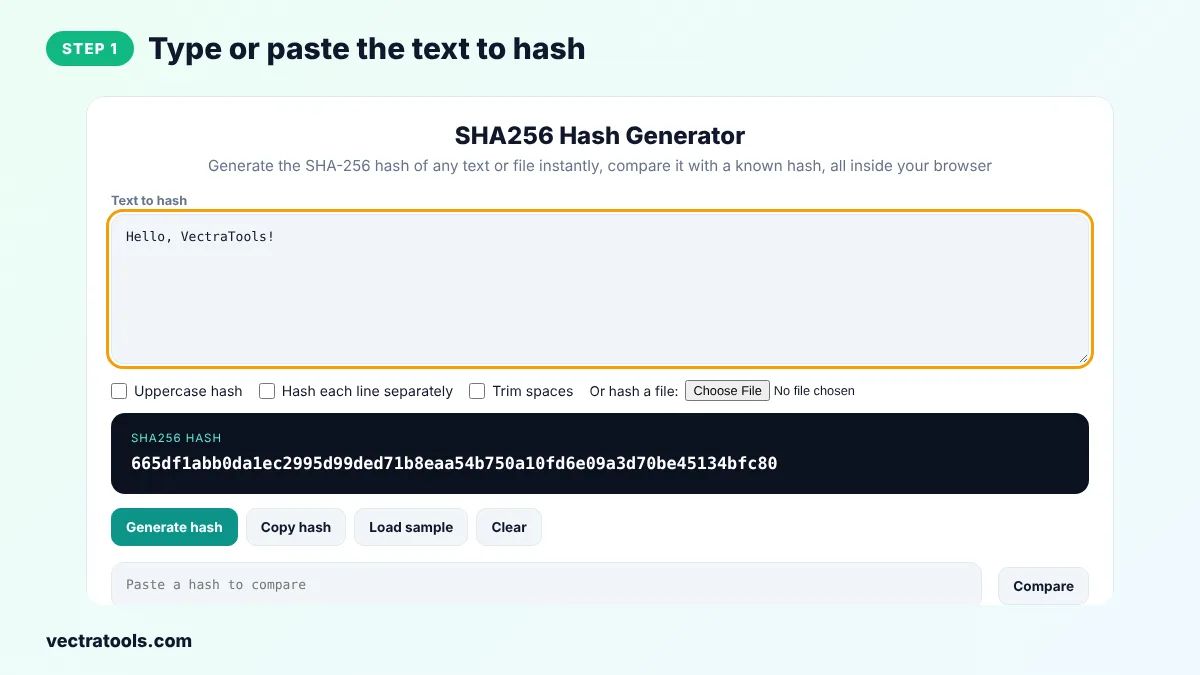
Step 1: Type or Paste the Text to Hash
Enter your text in Text to hash, or click Load sample. The SHA-256 hash updates live as you type.
Step 2: Choose Case, Per-Line or File Options
Tick Uppercase hash for capital letters, Hash each line separately for one hash per line, or Trim spaces to ignore leading and trailing spaces. Click Choose File to hash a file instead of text.

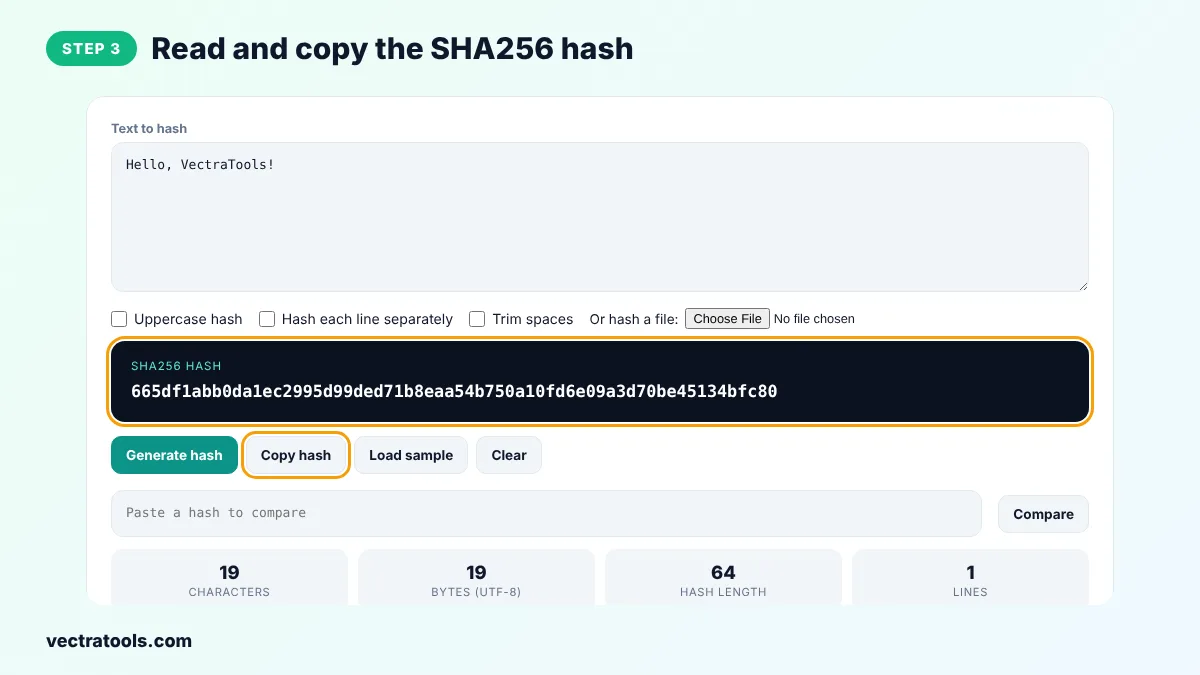
Step 3: Read and Copy the SHA-256 Hash
The 64-character SHA-256 hash appears in the dark box. Click Copy hash to copy it. The cards show characters, UTF-8 bytes and lines.
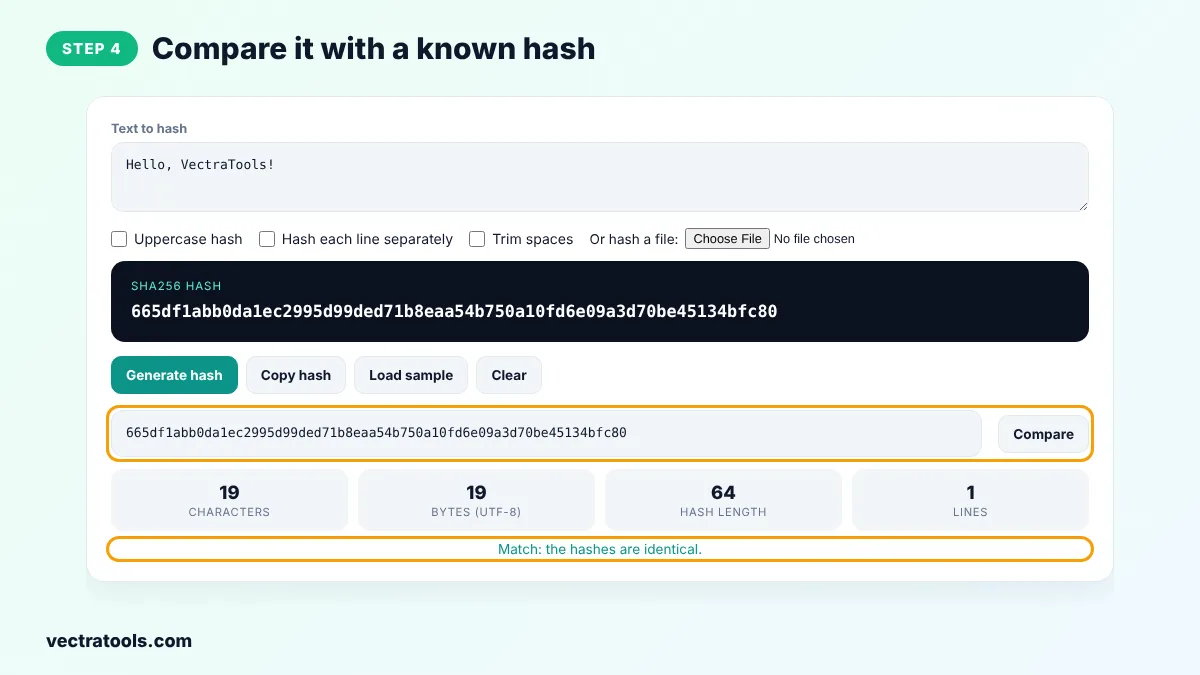
Step 4: Compare It with a Known Hash
Paste the SHA-256 checksum from a download page or a colleague into the compare box and click Compare. The tool shows whether the hashes match.
Who Uses a SHA256 Hash Generator?
Developers use a SHA256 hash generator to check API signatures, create content-addressed file names and verify package downloads. Security teams use SHA-256 hashes to identify known files and share indicators without sending the files themselves. Students and bloggers use it to show how a hash function turns any text into a fixed-length fingerprint.
Because this SHA256 hash generator runs in your browser with the Web Crypto API, it works with private files and internal data, and the result is the same as the sha256sum command on Linux or Get-FileHash on Windows for the same bytes.
Where SHA-256 Is Used and Why a SHA256 Hash Generator Helps
- File verification: Linux distributions, apps and drivers publish SHA-256 checksums so you can confirm a download is genuine.
- APIs and webhooks: HMAC-SHA256 signs requests so the receiver can prove they were not changed.
- Certificates: HTTPS certificates are signed with SHA-256.
- Blockchain: Bitcoin uses SHA-256 for mining and transaction IDs.
SHA256 Hash Generator Tips
- A line break at the end of the text changes the hash. Many command-line tools add one, so tick Trim spaces if results differ.
- Compare hashes in full. Checking only the first few characters is not a reliable test.
- For passwords, do not store a plain SHA-256 hash. Use a slow password hash such as bcrypt or Argon2 with a salt.
- Use Hash each line separately in the sha256 hash generator to fingerprint lists of IDs or emails in one step.
Frequently Asked Questions
What is a SHA256 hash?
A SHA256 hash is a 64-character hexadecimal fingerprint of some data, produced by the SHA-256 algorithm. The same data always gives the same hash, and different data gives a different hash.
Can SHA-256 be reversed or decrypted?
No. SHA-256 is a one-way function. You cannot get the original text back from the hash. Only short or common inputs can be guessed by trying many candidates.
Is SHA-256 secure?
Yes. SHA-256 has no known practical collision or preimage attack and is used across the web for certificates and signatures.
Why does my SHA-256 hash not match the terminal?
Commands such as echo add a line break at the end of the text, which changes the hash. Use echo -n, or tick Trim spaces here, so both tools hash exactly the same input.
Can I hash a file with this tool?
Yes. Click Choose File and select the file. It is read and hashed in your browser with the Web Crypto API and never leaves your device.
What is the difference between SHA-256 and SHA256?
There is no difference. SHA-256, SHA256 and SHA2-256 are all names for the same algorithm.
Is my data sent to a server?
No. The SHA256 hash generator runs entirely in your browser, so your text and files stay private.