

CSS Minifier Online – Compress CSS Code Free in 3 Easy Steps
CSS Minifier Online
Use this CSS minifier online to compress stylesheets, remove comments and see the bytes saved instantly
Use this free CSS minifier online to shrink your stylesheets for faster websites. Paste your CSS, and the tool removes comments, line breaks, extra spaces and unneeded semicolons, then shows how many bytes you saved. Copy the compressed code with one click.
Quick answer
CSS minification removes characters a browser does not need, such as comments, indentation, line breaks and the last semicolon in each rule, without changing how the styles work. A 283-byte stylesheet in the example below drops to 204 bytes, a 27.9% saving. Smaller CSS downloads faster, which helps page speed and Core Web Vitals.
Table of Contents
Stylesheets grow quickly as a site gets more pages, themes and plugins. Every comment and blank line is useful while you are writing code, but visitors’ browsers download all of it. On mobile connections, those extra kilobytes delay the first paint of the page.
This CSS minifier online runs entirely in your browser, so your code never leaves your device.
What Is CSS Minification?
Minification is the process of removing everything from code that is there only for humans. For CSS that means comments, whitespace, line breaks and some redundant punctuation. The result is a single compact line that works exactly the same in the browser.
Minification is different from compression such as Gzip or Brotli, which your server applies when sending files. The two work well together: minify first, then let the server compress the smaller file.
What the CSS Minifier Removes
| Before | After | Why it is safe |
|---|---|---|
| /* Card component */ | (removed) | Comments are ignored by browsers |
| margin: 0 auto; | margin:0 auto; | Spaces around colons are optional |
| rgba(0, 0, 0, 0.1) | rgba(0,0,0,0.1) | Spaces after commas are optional |
| color: #1e293b;\n} | color:#1e293b} | The last semicolon before } is optional |
| Line breaks and indentation | One continuous line | Browsers do not need formatting |
How to Use the CSS Minifier Online
Step 1: Paste Your CSS
Copy the CSS from your stylesheet, theme file or code editor and paste it into the Input Raw Style Sheet Source Code box. You can include comments and media queries.
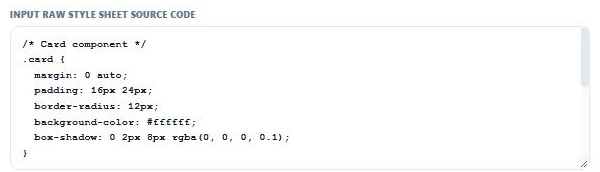
Step 2: Minify and Check the Savings
Press Minify / Compact CSS. The compressed CSS appears in the output panel, and a banner shows the size before and after. Here 283 bytes become 204 bytes, a 27.9% reduction.

Step 3: Copy the Minified CSS
Press Copy Minified CSS and paste the result into a new file, such as style.min.css, or into your site’s custom CSS box. Use Clear Panel to minify another file.

Why Minify CSS?
- Faster loading: CSS blocks rendering, so smaller files let the page appear sooner.
- Better Core Web Vitals: quicker CSS delivery helps Largest Contentful Paint.
- Lower bandwidth: useful for high-traffic sites and visitors on mobile data.
- Cleaner production code: keep a readable version for editing and a minified version for the live site.
Best Practices for Minified CSS
- Always keep your original, readable CSS file. Minified code is hard to edit.
- Name files clearly, for example style.css for editing and style.min.css for production.
- Test your pages after minifying, especially if your CSS uses unusual hacks.
- Combine minification with server compression and browser caching for the biggest gain.
- If you use WordPress, a caching plugin can minify automatically, but a manual check is useful for custom snippets.
Typical Savings From CSS Minification
Savings depend on how the original was written. Heavily commented and indented stylesheets often shrink by 20% to 40%. Files that were already compact may only lose a few per cent. Whatever the figure, the CSS minifier online shows the exact before and after size every time.
Need to read minified code again? Beautify markup with the HTML Formatter. Converting forum markup? Try the BBCode to HTML Converter.
Frequently Asked Questions
What does a CSS minifier do?
It removes comments, whitespace, line breaks and unneeded semicolons from CSS so the file is smaller but works exactly the same.
Will minifying CSS break my website?
Standard CSS keeps working. Text inside quotes, such as content values and font names, is preserved. Test your pages after minifying, as with any change.
How much smaller will my CSS get?
Commented, nicely formatted CSS often shrinks by 20% to 40%. The tool shows the exact saving in bytes and per cent.
Is minification the same as Gzip compression?
No. Minification changes the code itself. Gzip or Brotli compression is applied by the server during transfer. Use both for the best result.
Can I un-minify CSS?
You can reformat minified CSS with a beautifier, but removed comments cannot be recovered. Keep your original file.
Is my code uploaded anywhere?
No. The CSS minifier online works entirely in your browser.