

Domain Age Calculator – Find a Website’s Exact Age from Its Registration Date in 2 Easy Steps
Website Domain Age Calculator
Calculate the exact lifespan of a domain based on its registration date. Perfect for SEO audits and expired domain research.
Use this free domain age calculator to turn a domain’s registration date into its exact age for SEO audits, link vetting and expired-domain research.
Quick answer
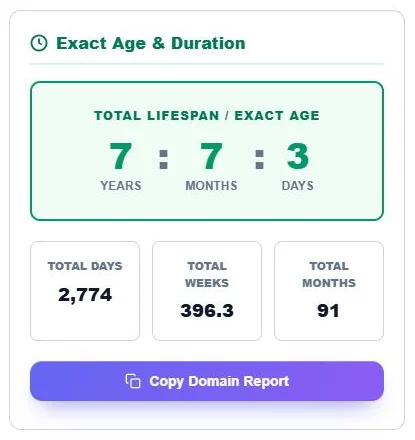
Domain age is the time since a domain was first registered. Find the Creation Date in a WHOIS or RDAP lookup, enter it in the calculator and leave the end date blank to measure up to today. Example: a domain created on 15 March 2019 is 7 years, 7 months and 3 days old on 18 October 2026, which is 2,774 days, 396.3 weeks or 91 months.
Table of Contents
When you buy guest posts, vet link sellers, evaluate an expired domain or audit a client site, domain age is one of the first things to check. An older domain with a clean history usually has more backlinks, more brand searches and a longer track record.
WHOIS records only give a date. This domain age calculator turns it into an exact age and totals you can paste straight into a report or outreach sheet.
Where to Find a Domain’s Creation Date
- Open a WHOIS or RDAP lookup service, such as your registrar’s WHOIS page or the ICANN lookup.
- Search the domain name without https:// or www.
- Find the field called Creation Date, Created On or Registered On.
- Enter that date in the calculator.
Do not use the “Updated Date” or “Expiry Date”; they change with renewals and say nothing about age.
How to Use the Domain Age Calculator
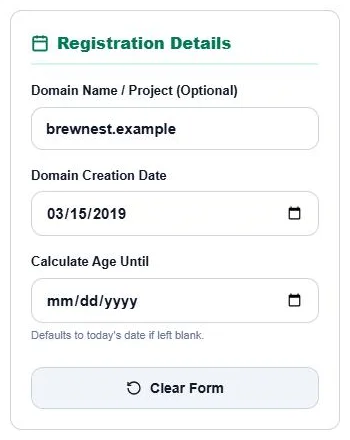
Step 1: Enter the Domain and Creation Date
Optionally type the Domain Name / Project so it appears in your report. Pick the Domain Creation Date from the WHOIS record. Leave Calculate Age Until blank to use today, or set a past date to see how old the domain was at that time. Click Clear Form to reset.
Step 2: Read the Age and Copy the Report
The Exact Age & Duration panel shows the age in years, months and days, with total days, total weeks and total months below. Click Copy Domain Report to paste the result into a sheet or email.
Does Domain Age Affect SEO?
Google has said that domain age by itself is not a ranking factor. What matters is what usually comes with age: a history of useful content, natural backlinks and brand recognition. A new domain can outrank an old one with better content and links, and an old domain with spammy history can be a liability.
How SEOs Use Domain Age
| Use | What to check |
|---|---|
| Guest post and link vetting | Very new domains with high DR can be a sign of manipulated metrics |
| Expired domain buying | Compare creation date with archive history to spot gaps or ownership changes |
| Competitor research | See how long top-ranking sites have been building authority |
| Client audits | Set realistic timelines for a brand-new site |
| PBN risk checks | Many domains created around the same date can be a footprint |
Domain Age vs Registration Length
Domain age counts from the first registration. Registration length is how far ahead the domain is paid for. Paying for several years at once does not make a domain “older” and is not a ranking signal, although it shows the owner plans to keep it.
Tips
- If a domain dropped and was re-registered, WHOIS usually shows the new creation date, not the original one.
- Use a web archive to see when real content started, which can differ from registration.
- Some country-code domains hide or limit WHOIS data; check the registry’s own lookup.
Frequently Asked Questions
What is domain age?
It is the time since a domain name was first registered, usually taken from the Creation Date in its WHOIS record.
How do I check how old a website is?
Look up the domain’s creation date in a WHOIS tool, then enter it in this calculator to get the exact age.
Is domain age a Google ranking factor?
Not directly. Older sites often rank well because of their content and backlinks, not their age alone.
Can I calculate age at a past date?
Yes. Set Calculate Age Until to any date to see how old the domain was then.
Why does WHOIS show a recent date for an old site?
The domain may have expired and been registered again, which resets the creation date.
Is the domain age calculator free?
Yes. It is free, runs in your browser and needs no sign-up.