

Free Dot & Cross Product Calculator – 3D Vectors
Vector Product Calculator
Enter the components of two 3D vectors to calculate their dot product, cross product, and angle.
Vector A
Vector B
Quick answer
The dot product of A and B is A·B = AxBx + AyBy + AzBz (a single number), while the cross product A × B = (AyBz − AzBy, AzBx − AxBz, AxBy − AyBx) is a new vector perpendicular to both. Example: A = (4, 5, 4) and B = (5, 5, 7) give A·B = 73 and A × B = (15, −8, −5), with an angle of about 13.64°. This calculator shows the dot product, cross product, angle and both magnitudes at once.
Table of Contents
Solving Two Vector Problems in One Place
Welcome to the most accurate dot product calculator available online. If you work with linear algebra, physics, or 3D geometry, you already know the frustration: you are halfway through a complex mechanics problem or a 3D graphics rendering script, and you suddenly need both the scalar and vector results for two vectors. Most students, engineers, and developers run into the exact same wall. They end up using a basic dot product calculator for one part of the equation, open a separate cross product calculator in another tab, and then manually figure out the vector magnitudes or the angle between them. It is a time consuming and highly error prone process.
This dot product of two vector calculators on VectraTools is designed specifically to eliminate that friction. Instead of juggling multiple tabs, re-entering the same numbers, or grinding through complex matrix determinants by hand twice, this tool handles every core operation from a single, intuitive input screen.
By entering just one set of data—the x, y, and z (or i, j, k) components of Vector A and Vector B—you instantly receive a complete vector analysis. The tool automatically computes the dot product, the cross product, the exact angle between the vectors, and the individual vector magnitudes in one single pass instead of three.
It is built as an all-in-one 3D vector calculator for anyone working heavily in multidimensional space:
- Physics & Engineering Students: Quickly verify complex homework assignments, cross-check torque values, or validate magnetic force computations without second-guessing your manual arithmetic. A single sign error in a cross product changes everything, and this tool provides an instant way to double-check your work.
- Software & Game Developers: Double-check your geometry math, surface normals, or lighting calculations for 3D rendering engines and robotics projects.
- Educators & Professionals: Streamline your workflow during iterative design work where recalculating vector pairs by hand would just slow you down.
Instead of breaking your focus to solve the underlying math step-by-step, you get every related value at once. You enter the components, and the tool does the heavy lifting, allowing you to focus purely on the bigger picture of your project or assignment.
Quick Summary
- Five Results from One Input: Computes the scalar dot product, the resulting cross product vector, the exact angle between the two vectors, and the magnitudes of both Vector A and Vector B all at the same time.
- Instant Browser Processing: Accepts X, Y, and Z components for both vectors and processes the math entirely inside your web browser. There is no account registration required and no need to download any software.
- Easy Data Export: Features a built in Copy Results button. This allows you to grab the complete mathematical report with one click and paste it directly into your digital notes, engineering assignments, or programming code.
What Is a Dot Product (Scalar Product)?
The dot product is a basic mathematical operation in linear algebra. When you multiply two vectors using this method, the result is a single standard number rather than a new vector. This single number is called a scalar, which is why many people refer to this operation as a scalar product.
Geometrically, this calculation tells you how much of one vector points in the exact same direction as the second vector. If both vectors point the same way, the value is at its maximum. If they are completely perpendicular to each other, the resulting value will always be exactly zero.
This concept has huge practical value in physics and engineering. For example, calculating the work done by a force moving an object requires a dot product.
To solve it manually, you multiply the matching X, Y, and Z components of both vectors and add those numbers together. Using a vector scalar product calculator makes this process much faster and helps you avoid basic addition or multiplication errors.
What Is a Cross Product (Vector Product)?
Unlike the dot product which gives you a single number, the cross product of two vectors results in a brand new third vector. Because the final answer is a complete vector with its own specific direction and magnitude, this operation is widely known as a vector product.
This newly created vector is completely perpendicular to both of the original vectors. In terms of geometry, the length of this resulting vector represents the total area of the parallelogram formed by your two starting vectors. You can easily determine its physical direction using the standard right hand rule.
This specific calculation is absolutely essential for 3D applications. Physicists use it all the time to calculate torque, magnetic forces, and rotational movement. Software developers also rely on it heavily in 3D graphics to figure out surface normals, which tells the computer exactly how light should bounce off a 3D object.
Working this out manually requires setting up a matrix determinant and carefully tracking multiple positive and negative signs. Since just one misplaced minus sign ruins the entire resulting vector, using a dedicated vector product calculator is the smartest way to guarantee accurate numbers without the mental strain.
Key Differences: Dot Product vs. Cross Product
Understanding the difference between these two calculations is critical for any student or professional working with linear algebra. While they both take two input vectors, their final outputs and physical meanings are completely different.
Here is a simple comparison to help you keep the core concepts straight:
| Feature | Dot Product | Cross Product |
| Final Result Output | A single number (Scalar) | A brand new vector |
| Geometric Meaning | Measures directional overlap | Creates a perpendicular vector |
| Mathematical Rule | Order does not matter (A · B = B · A) | Order matters (reversing them changes the sign) |
| Zero Value Condition | Occurs when vectors are exactly perpendicular | Occurs when vectors are exactly parallel |
| Common Application | Calculating physical work or energy | Calculating torque or 3D surface normals |
Mixing up these two operations is a very common mistake in physics exams and programming assignments. Our calculator helps eliminate this confusion by displaying both answers side by side. You get to see the scalar number and the resulting vector simultaneously without running two separate operations.
Dot Product and Cross Product Formulas
Knowing the exact math behind the tool is highly important for exam preparation and debugging complex programming code. When dealing with vectors in 3D space, every vector has an X, Y, and Z component. Here is how the actual math works under the hood.
The Dot Product Formula
The algebraic dot product formula is quite straightforward. You simply multiply the matching directional components of both vectors and add those resulting numbers together.
There is also a geometric version of this equation. This alternative version uses the total lengths of both vectors and the exact angle between them.
The Cross Product Formula
The cross product equation is much more complex. It requires calculating a matrix determinant to find the X, Y, and Z components of your brand new perpendicular vector. The standard equation looks like this:
Memorizing these mathematical equations is very helpful for passing your physics or linear algebra exams. However, calculating the cross product matrix determinant by hand leaves a lot of room for simple addition or subtraction errors. Running your numbers through a reliable vector dot product calculator ensures your component math remains perfectly accurate every single time.
Important Vector Properties to Remember
Before using the calculator, keeping a few mathematical rules in mind will help you understand your results much faster. These properties are common trick questions in university exams and programming interviews.
The Order of Inputs Matters When calculating the dot product, the order of your inputs does not matter at all. Vector A multiplied by Vector B is exactly equal to Vector B multiplied by Vector A. However, the cross product is completely different. If you swap the order of your inputs for a cross product, the resulting vector will point in the exact opposite direction.
The Quick Orthogonal Check If you enter your components into the tool and the dot product result is exactly zero, you instantly know that the two vectors are perfectly perpendicular to each other. Civil engineers and 3D developers use this specific property constantly to verify exact 90 degree angles in their structural designs.
The Parallel Vector Rule If you look at the cross product result and see zero for the X, Y, and Z components, your two vectors are perfectly parallel. This means they are either pointing in the exact same direction or exact opposite directions.
Knowing these three simple rules allows you to look at the output from a 3D vector calculator and immediately understand the physical relationship between your two vectors without doing any extra math.
How to Use the Dot Product & Cross Product Calculator
We built this tool to be simple and fast. The screen is split into two clear sections so there is absolutely no confusion about where your numbers belong. You do not need to navigate through complex menus or settings to get your answers.
Follow these simple steps to perform your complete vector analysis:
- Input Vector A: Type your X, Y, and Z component values into the first set of fields on the left side of the screen.
- Input Vector B: Type the component values for your second vector into the second set of fields.
- Calculate: Click the Calculate Products button located just below the input blocks.
- View the Results: The screen will instantly display your complete Vector Analysis Report. This report neatly lists your scalar number, your brand new perpendicular vector, the exact angle between the two vectors, and the individual magnitude lengths.
- Copy the Output: Click the Copy Results button to grab all five answers at once. You can then paste the text directly into your homework document, lab report, or programming software without retyping a single number.
How to Calculate 2D Vectors Using a 3D Vector Calculator
Many students ask if they can use this specific tool for simpler two dimensional math problems. The answer is absolutely yes. In mathematics, a two dimensional vector is really just a three dimensional vector that has absolutely no depth.
To solve a two dimensional problem, simply enter your known X and Y values just like normal. Then, type a zero into the Z component field for both Vector A and Vector B.
When you click the calculate button, the tool processes the exact same mathematical formulas. The resulting scalar number, the angle between the two vectors, and both magnitude lengths will be perfectly accurate for your specific two dimensional homework problem.
This simple zero trick means you can use this same 3D vector calculator for your early physics assignments and your advanced linear algebra coursework without ever needing to find a separate website.
Worked Example: Step by Step Calculation
Let us look at a real world example using the exact numbers shown in our tool interface. As you can see in the provided image, we have entered the specific directional components for two distinct vectors.
For Vector A, the components are 4, 5, and 4. For Vector B, the components are 5, 5, and 7.
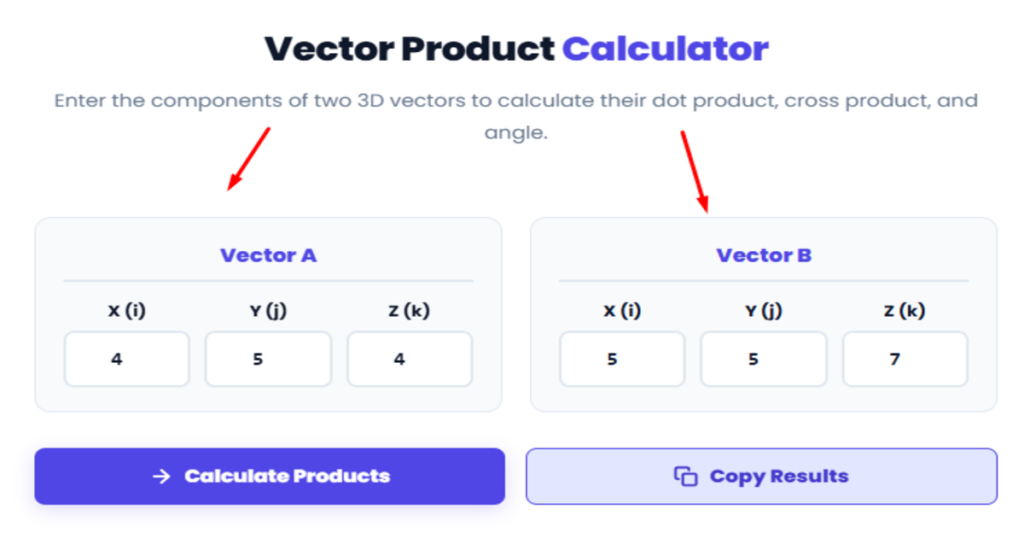
First we will calculate the scalar number by multiplying the matching directional components and adding them together. (4 * 5) + (5 * 5) + (4 * 7) 20 + 25 + 28 equals 73. Your final scalar result is exactly 73.
Next we calculate the new perpendicular vector using the matrix determinant rule. The X component is (5 * 7) minus (4 * 5) which gives you 15. The Y component is (4 * 5) minus (4 * 7) which gives you negative 8. The Z component is (4 * 5) minus (5 * 5) which gives you negative 5. Your final resulting vector has the components 15, negative 8, and negative 5.
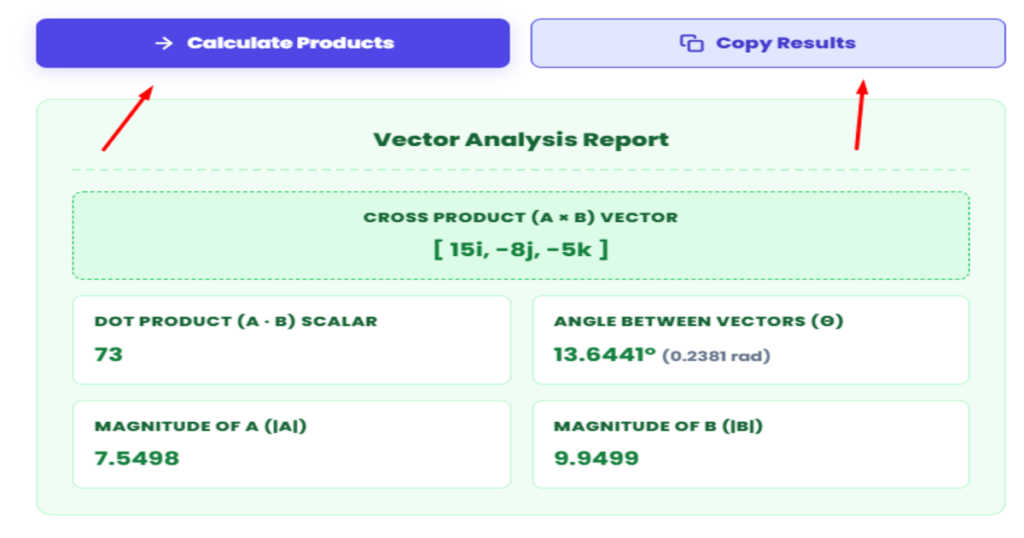
When you click the calculate button, the tool processes this math instantly. You can easily verify in the provided results image that the final Vector Analysis Report perfectly matches our manual math, showing a scalar of 73 and a new vector of 15i, negative 8j, and negative 5k.
Understanding the Extra Outputs: Angle Between Vectors and Magnitude
Along with the two main mathematical operations, our tool provides three additional pieces of critical data to complete your analysis. These extra outputs are clearly visible in the bottom section of the results image.
Vector Magnitudes The magnitude represents the exact physical length of a vector in 3D space. Using our previous example numbers, the tool automatically calculates the exact magnitude of Vector A as 7.5498 and the magnitude of Vector B as 9.9499. Knowing these precise lengths is essential when you need to normalize a vector for computer graphics or advanced physics simulations.
Angle Between Vectors Instead of forcing you to use a separate scientific calculator to find the arccosine of your scalar result, the tool does all that heavy lifting for you. In our specific example, the report shows an exact angle of 13.6441 degrees or 0.2381 radians. This tells you exactly how far apart the two vectors are pointing relative to each other without requiring any extra manual steps.
Real World Applications in Physics and Engineering
These mathematical calculations are not just abstract numbers on a classroom whiteboard. They are the fundamental building blocks of modern engineering, physics, and computer science. Professionals across multiple industries rely on these operations every single day.
Calculating Physical Work and Energy Mechanical engineers use the scalar product to figure out exactly how much work is done when a force moves an object. If you apply a force to push a heavy box across a factory floor, the total work done is the scalar result of the force vector and the distance vector. It measures how much energy was actually transferred in the exact direction of movement.
Solving Torque and Magnetic Forces Civil engineers and physicists depend heavily on the perpendicular vector output to calculate torque. When you pull on a wrench to tighten a bolt, the rotational force you create is a brand new perpendicular vector. Electrical engineers use this exact same math to determine the direction of magnetic forces interacting with electrical currents.
Designing 3D Graphics and Video Games Software developers need both of these operations to build realistic 3D video games and rendering engines. To make a virtual object look real, the computer needs to know exactly how simulated light hits its surface. Developers calculate the perpendicular vector to find the surface normal, and they use the scalar number to figure out exactly how bright that specific pixel should be.
Having a fast and reliable 3D vector calculator allows professionals in all these fields to solve complex spatial problems quickly without wasting valuable time on manual arithmetic.
Why Professionals and Students Choose This Calculator
Most online math tools force you to do one thing at a time. If you need multiple answers, you have to load different pages and enter the exact same numbers multiple times. We built this specific tool to fix that exact problem and speed up your workflow.
One Input for Five Answers You type your component numbers exactly once. The tool instantly gives you the scalar result, the new perpendicular vector, the exact angle, and both magnitude lengths. There is absolutely no repetitive data entry required.
Automatic Angle Calculation Normally, you would need to take your scalar result and manually work out the arccosine on a separate scientific calculator to find the angle. We removed that extra step. The exact angle between your two vectors is automatically included right inside your final report.
No Account Required When you are in the middle of a complex physics assignment or coding project, you do not want to hit a login wall. This tool is completely open and ready to use the second the page loads. There are no subscriptions and no software downloads.
Ready to Copy Output The copy results button grabs your entire mathematical report as plain text. You can paste it straight into your lab report, homework document, or programming comments without needing to reformat a single number.
VectraTools vs. Other Platforms
Many math websites offer vector calculators, but they often come with hidden frustrations. Some require you to create an account before you see your final answer, while others blast you with popup video ads that slow down your web browser. We designed VectraTools to be the exact opposite.
Here is a quick look at how our platform compares to the average online math website:
| Feature | VectraTools | Most Other Platforms |
| Results Display | All five answers on one screen | One answer per page |
| Account Required | None | Often requires email signup |
| Processing Speed | Instant browser calculation | Slow server side loading |
| Data Export | One click copy button | Manual highlighting required |
| Visual Interface | Clean and distraction free | Cluttered with heavy graphics |
Our main goal is to give you the exact numbers you need as quickly as possible so you can get back to your actual work. There is absolutely no clutter to get in your way.
Frequently Asked Questions (FAQs)
How do I find the dot product of two vectors?
To find it manually, you multiply the matching X, Y, and Z components of both vectors and add those three results together. For a faster and completely error free calculation, you can simply type your components into our dot product of two vectors calculator to get the answer instantly.
Can a vector product result be a standard number?
No. A vector product always results in a brand new vector with its own distinct direction and magnitude. If you are looking for a single standard number, you need to calculate the scalar product. Our vector scalar product calculator displays both of these results on the same screen so you never confuse the two.
How do you find the exact angle between two vectors?
Calculating the angle manually requires you to find the scalar number first, calculate the magnitude lengths of both vectors, and then apply the arccosine geometric function. Our 3D vector calculator handles all of this complex math automatically and displays the exact angle in degrees directly in your final report.
Does the order of my vectors matter?
It depends entirely on the mathematical operation. For a scalar calculation, the input order does not matter at all. However, for a cross calculation, changing the order of Vector A and Vector B will completely flip the physical direction of your resulting vector.
Why did the calculator give me a zero result?
If your final scalar result is exactly zero, it means your two starting vectors are perfectly perpendicular. On the other hand, if your new perpendicular vector has a zero for all three of its directional components, it means your original two vectors are perfectly parallel.
More Helpful Tools from VectraTools
Linear algebra and multidimensional geometry are usually just the starting points for most engineering and computer science students. Once you master basic directional vectors and scalar numbers, your coursework will eventually move on to complex matrix transformations. If you are dealing with square matrices and need to find their scalar multipliers to understand how they stretch or shrink space, our Eigenvalue and Eigenvector Calculator is the perfect next step. It takes the heavy lifting out of finding the characteristic equations and roots so you can focus on the actual theory.
Moving beyond pure geometry, many science professionals and developers also need to handle statistical data and probability modeling. Whether you are running quality control tests or analyzing research data, manual statistical math is highly prone to human error. You can easily use our Binomial Distribution Calculator to figure out the exact probability of specific successes within a fixed number of trials. Furthermore, if you are conducting hypothesis testing to see how well your observed data actually fits your expected models, our Chi Square Calculator will give you the precise variance values instantly.
While our platform provides the exact numerical answers you need to keep your projects moving forward quickly, understanding the deep mathematical theory behind these numbers is equally important. If you want to strengthen your core concepts regarding vector spaces and matrix operations, we highly suggest reading the free educational guides at Khan Academy. Their linear algebra curriculum is trusted by universities worldwide and offers brilliant visual explanations that perfectly complement our calculation tools.
Author's Verdict: A Calculator Worth Bookmarking (My Rating: 4.5/5)
As someone who builds utility platforms to solve everyday digital and mathematical headaches, I know how frustrating it is to land on a website that promises quick answers only to hit a wall of popup ads or mandatory sign up forms. We created VectraTools specifically to fix that broken experience.
After testing this tool extensively with various physics problems and linear algebra assignments, I am proudly giving it a solid 4.5 out of 5 rating.
It handles both scalar and vector results simultaneously, calculates the exact angle and magnitudes instantly, and leaves zero room for manual component errors. The layout is completely distraction free and requires zero downloads or logins. While there is always room to add more visual graphing features in future updates, this calculator delivers everything a student, engineer, or developer needs right now in one single screen.
If you work with 3D space, physics mechanics, or computer graphics, this is one page you will definitely want to save to your browser bookmarks for quick access.