

Paycheck Deductions Estimator – Calculate Take-Home Pay in 3 Easy Steps
Paycheck Deductions Estimator
Use this paycheck deductions estimator to estimate your take-home pay by factoring in taxes, retirement, and insurance deductions.
Use this free paycheck deductions estimator to work out how much of your salary actually lands in your bank account. Enter your annual gross pay and how often you are paid, then add your tax rate, retirement contribution, health insurance and other deductions. The tool shows your net take-home pay per paycheck with a full breakdown.
Quick answer
Take-home pay per paycheck = (annual salary ÷ number of paychecks) − taxes − retirement contributions − insurance − other deductions. For a $60,000 salary paid bi-weekly (26 times a year), gross pay is $2,307.69. With a 22% tax rate, 5% to a 401(k), $120 for health insurance and $40 of other deductions, take-home pay is about $1,524.62 per paycheck.
Table of Contents
A job offer usually quotes a yearly salary, but bills are paid from each paycheck. The gap between the two can be surprisingly large once taxes, retirement savings and insurance come out.
This paycheck deductions estimator shows that gap in seconds, so you can compare offers, plan a budget or check a payslip. It runs in your browser and stores nothing.
What Comes Out of a Paycheck?
- Income taxes: federal, state and sometimes local income tax, withheld based on your earnings and tax form choices.
- Payroll taxes: in the US, Social Security and Medicare (FICA) together take 7.65% of most wages.
- Retirement contributions: money you choose to put into a 401(k), 403(b) or similar plan.
- Health insurance: your share of medical, dental or vision premiums.
- Other deductions: union dues, life insurance, wage garnishments, commuter benefits and so on.
In the paycheck deductions estimator, enter your combined federal, state and payroll tax rate in the tax box for a simple estimate. Your latest payslip is the best place to find a realistic figure.
Paycheck Deduction Formulas
- Gross pay per paycheck = annual salary ÷ pay periods per year
- Taxes = gross pay × tax rate
- Retirement = gross pay × contribution %
- Total deductions = taxes + retirement + health insurance + other
- Net take-home pay = gross pay − total deductions
Pay Frequency Explained
| Pay frequency | Paychecks per year | Gross pay on $60,000 |
|---|---|---|
| Weekly | 52 | $1,153.85 |
| Bi-weekly | 26 | $2,307.69 |
| Semi-monthly | 24 | $2,500.00 |
| Monthly | 12 | $5,000.00 |
| Annually | 1 | $60,000.00 |
Bi-weekly and semi-monthly sound similar but are not the same. Bi-weekly means every two weeks, which gives 26 paychecks and two months a year with three paydays. Semi-monthly means twice a month, usually on fixed dates, for 24 paychecks.
How to Use the Paycheck Deductions Estimator
Step 1: Enter Salary, Pay Frequency and Deductions
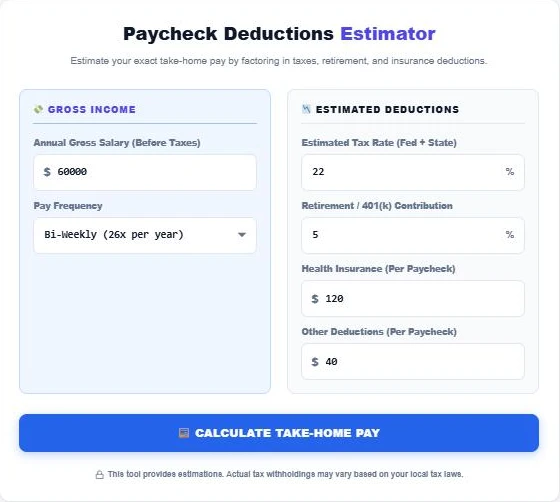
Type your annual gross salary and pick your pay frequency. Then enter your estimated tax rate, your retirement contribution as a percentage, and your health insurance and other deductions in dollars per paycheck.
Step 2: See Your Take-Home Pay
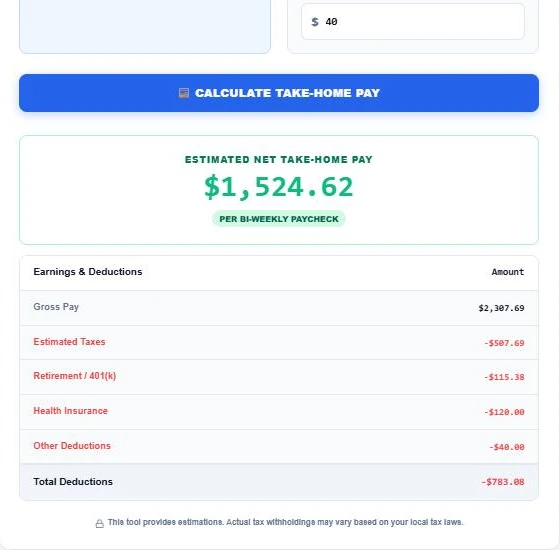
Press Calculate Take-Home Pay. For $60,000 paid bi-weekly, gross pay is $2,307.69. Taxes of $507.69, a 401(k) contribution of $115.38, health insurance of $120 and other deductions of $40 leave $1,524.62 in take-home pay.
Step 3: Compare Pay Schedules and Deductions
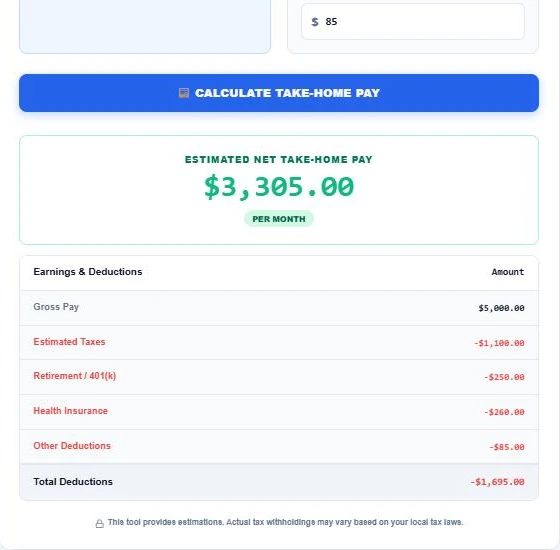
Switch to Monthly and update the per-paycheck amounts to see a monthly view. With $260 health insurance and $85 other deductions each month, the same salary gives $3,305 a month after $1,695 of deductions.
Ways to Increase Your Take-Home Pay
Once the paycheck deductions estimator shows where your money goes, these steps can leave more in each payslip:
- Check your tax withholding form if you get a large refund every year; you may be over-withholding.
- Use pre-tax benefits such as health savings or flexible spending accounts where available.
- Compare health plans at open enrollment, since premiums vary a lot.
- Balance retirement saving with today’s budget; even a small contribution with an employer match is worth keeping.
- Review your payslip every few months for mistakes or deductions you no longer need.
Limits of This Estimate
The calculator applies one flat tax rate to gross pay. In reality, traditional 401(k) contributions and some insurance premiums are taken before income tax, progressive tax brackets apply, and payroll taxes have their own rules and caps. Use the result for budgeting and offer comparisons, and rely on your employer’s payroll for exact figures.
Planning ahead? See how much salary you need to keep up with rising prices using the Inflation Purchasing Power Calculator, or check your borrowing comfort with the Debt-to-Income Ratio Calculator.
Frequently Asked Questions
How do I calculate my take-home pay?
Divide your annual salary by the number of paychecks, then subtract taxes, retirement contributions, insurance and other deductions from that amount.
What tax rate should I enter?
Use your combined federal, state and payroll tax rate. Dividing the total tax on a recent payslip by gross pay gives a realistic figure.
Is the salary field annual or per paycheck?
Annual. The tool divides your annual gross salary by the pay frequency you choose.
What is the difference between bi-weekly and semi-monthly pay?
Bi-weekly is every two weeks, 26 paychecks a year. Semi-monthly is twice a month, 24 paychecks a year.
Why is my real paycheck different from the estimate?
Payroll uses tax brackets, pre-tax deductions and caps that a single flat rate cannot capture. The estimator is a planning tool, not a payroll system.
Is my salary information stored?
No. Everything is calculated in your browser and nothing is saved.