

Luminance Unit Converter – Nits to cd/m² & Foot-Lamberts in 3 Easy Steps
Luminance Converter
Use this luminance unit converter: type a value into any field to convert nits, cd/m², foot-lamberts and lamberts.
Use this free luminance unit converter to switch between nits, candela per square metre (cd/m²), foot-lamberts (fL) and lamberts (L). Type a value in any box and the rest update instantly, which helps when you compare monitor, TV, phone, projector and cinema brightness specs.
Quick answer
1 nit = 1 cd/m², exactly. 1 foot-lambert = 3.426 cd/m², and 1 lambert = 3,183.1 cd/m² (10,000 ÷ π). To convert nits to foot-lamberts, multiply by 0.2919. For example, a 1,000-nit HDR screen is about 291.86 fL, and the 14 fL cinema standard is about 48 nits.
Table of Contents
Display makers love brightness numbers, but they do not all use the same unit. Phone and monitor specs list nits, projector and cinema standards often use foot-lamberts, and older scientific papers use lamberts. Comparing them side by side needs a quick conversion.
This luminance unit converter handles all four units with one input. It runs in your browser.
What Is Luminance?
Luminance is the amount of light coming from a surface in a given direction, per unit of area. It describes how bright a screen, sign or lit wall looks to your eye. The SI unit is the candela per square metre (cd/m²), which the display industry calls the nit.
Luminance is different from illuminance. Illuminance, measured in lux or foot-candles, is how much light falls on a surface. Luminance is how much light leaves it toward the viewer.
Luminance Conversion Formulas
- Nits to cd/m²: identical, 1 nit = 1 cd/m²
- cd/m² to foot-lamberts: fL = cd/m² × 0.29186
- Foot-lamberts to cd/m²: cd/m² = fL × 3.42626
- cd/m² to lamberts: L = cd/m² × π ÷ 10,000
- Lamberts to cd/m²: cd/m² = L × 3,183.1
Typical Screen and Display Brightness
| Display or reference | Nits (cd/m²) | Foot-lamberts |
|---|---|---|
| sRGB reference viewing | 80 | 23.3 |
| Cinema projection (DCI standard) | 48 | 14 |
| Typical laptop screen | 250 to 400 | 73 to 117 |
| Bright smartphone (peak) | 1,000 to 2,000+ | 292 to 584+ |
| HDR10 mastering level | 1,000 to 4,000 | 292 to 1,167 |
Real brightness depends on the content, settings and how much of the screen is lit. Peak HDR figures usually apply to small highlights, not the full screen.
How to Use the Luminance Unit Converter
Step 1: Enter a Brightness in Nits
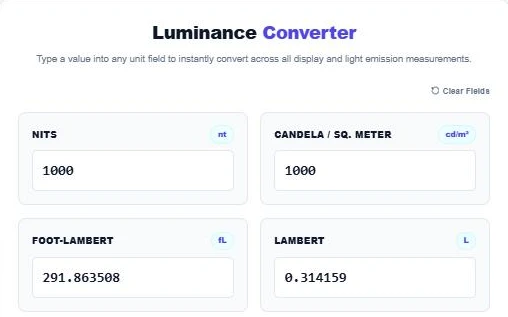
Type a value in the Nits box. A 1,000-nit HDR display converts to 1,000 cd/m², 291.863508 fL and 0.314159 L.
Step 2: Convert Foot-Lamberts to Nits
Start from any unit. Entering 14 fL, the usual cinema screen target, gives about 47.97 nits, which explains why cinema specs are often quoted as 48 cd/m².

Step 3: Use the Reference Matrix
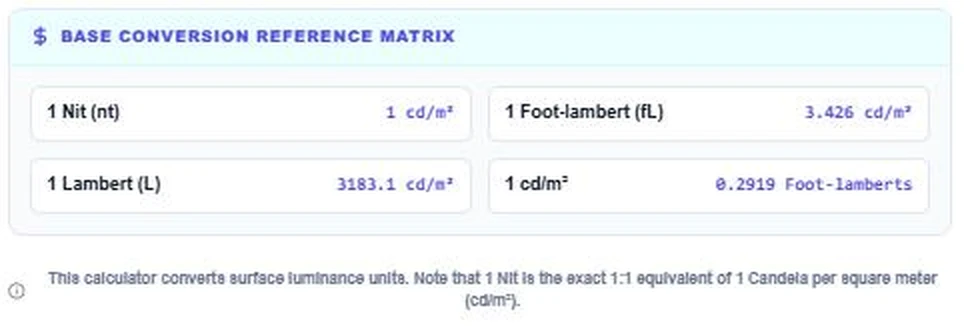
The matrix lists the key factors: 1 nit = 1 cd/m², 1 fL = 3.426 cd/m², 1 L = 3,183.1 cd/m² and 1 cd/m² = 0.2919 fL. Press Clear Fields to reset.
Nits, Lux and Lumens: What Is the Difference?
These three light units are often confused. Lumens measure the total amount of light a source gives off in all directions, which is why bulbs and projectors are sold by lumens. Lux measures how much of that light lands on each square metre of a surface, such as a desk or a wall. Nits measure how bright a surface looks when it gives off or reflects light toward you, which is the figure that matters for screens.
A projector rated at 3,000 lumens can produce very different nit values depending on screen size and screen material. A bigger screen spreads the same light over more area, so it looks dimmer. That is why projector reviewers measure foot-lamberts or nits on the actual screen, and why this luminance unit converter is useful when you compare a projector with a TV.
Who Needs Luminance Conversion?
- Shoppers comparing TVs, monitors, laptops and phones from different brands.
- Home cinema fans calibrating projectors to foot-lambert targets.
- Video editors and colourists working with SDR and HDR mastering levels.
- Lighting designers checking sign and display brightness limits.
- Students working through photometry problems.
Brightness Tips for Screens
- A brighter screen is easier to read outdoors, but very high indoor brightness can cause eye strain.
- For dark-room editing and cinema-style viewing, lower brightness gives more accurate colour.
- HDR content needs high peak brightness for highlights, but average picture level stays much lower.
Measuring light on a surface instead? Use the Illuminance Converter. To check readable colour combinations, try the Color Contrast Checker.
Frequently Asked Questions
Is a nit the same as cd/m²?
Yes. One nit is exactly one candela per square metre. Nit is simply the common name used for displays.
How do I convert nits to foot-lamberts?
Multiply by 0.2919. For example, 500 nits is about 146 fL.
How many nits is a good monitor?
For indoor office work, 250 to 350 nits is plenty. For HDR or bright rooms, 600 nits and above helps.
What is the difference between luminance and illuminance?
Luminance (nits) is light coming off a surface toward you. Illuminance (lux) is light falling onto a surface.
How bright is a cinema screen?
The DCI standard for digital cinema is 48 cd/m², about 14 foot-lamberts.
Is my data saved?
No. The luminance unit converter runs entirely in your browser.