

Harvard Citation Generator – Harvard References for Websites, Books and Journals
Harvard Citation Generator
Generate highly accurate Harvard style references for your university assignments, dissertations, and research papers.

Quick answer
Choose website, book or journal, enter the author (or organisation), year, title and the remaining details, then press Create Reference. The Harvard citation generator returns a reference such as: Khan, S.J. (2025) ‘How solar panels work’, Energy Explained. Available at: https://energyexplained.org/solar (Accessed: 2 October 2026).
Harvard is the author-date referencing style used by most UK and Australian universities and many business, health and social science courses. In-text you cite the author and year; the full reference goes in an alphabetical reference list.
This Harvard citation generator builds those reference-list entries for web pages, books and journal articles. It shortens first names to initials without spaces (S.J.), puts the year in round brackets and applies italics and quotation marks the Harvard way.
Harvard Formats Used by the Generator
| Source | Example output |
|---|---|
| Web page | Khan, S.J. (2025) ‘How solar panels work’, Energy Explained. Available at: https://energyexplained.org/solar (Accessed: 2 October 2026). |
| Organisation as author | BBC News (2025) ‘How solar panels work’, Energy Explained. Available at: URL (Accessed: date). |
| Book | Clear, J. (2018) Atomic habits. London: Random House. |
| Journal article | Lopez, M.E. (2023) ‘Sleep and memory in adolescents’, Journal of Sleep Research, 32(4), pp. 112-125. Available at: https://doi.org/10.1111/jsr.13800. |
Harvard is not controlled by one publisher, so universities publish slightly different versions. The output follows the widely used Cite Them Right conventions; check your course handbook for small differences such as whether web page titles are in quotation marks or italics.
How to Use the Harvard Citation Generator
Keep the source open so you can copy the details exactly. Fields change with the source type.
Step 1: Select the source type
Pick Website / Webpage, Book or Academic Journal. Books ask for the place of publication and publisher; journals ask for volume, issue and pages.

Step 2: Enter the author or organisation, year and access date
Type the author’s first name(s) and last name. For a corporate author such as BBC News, put the organisation in the last-name box and leave first name blank. Add the year and, for online sources, the date you accessed it.
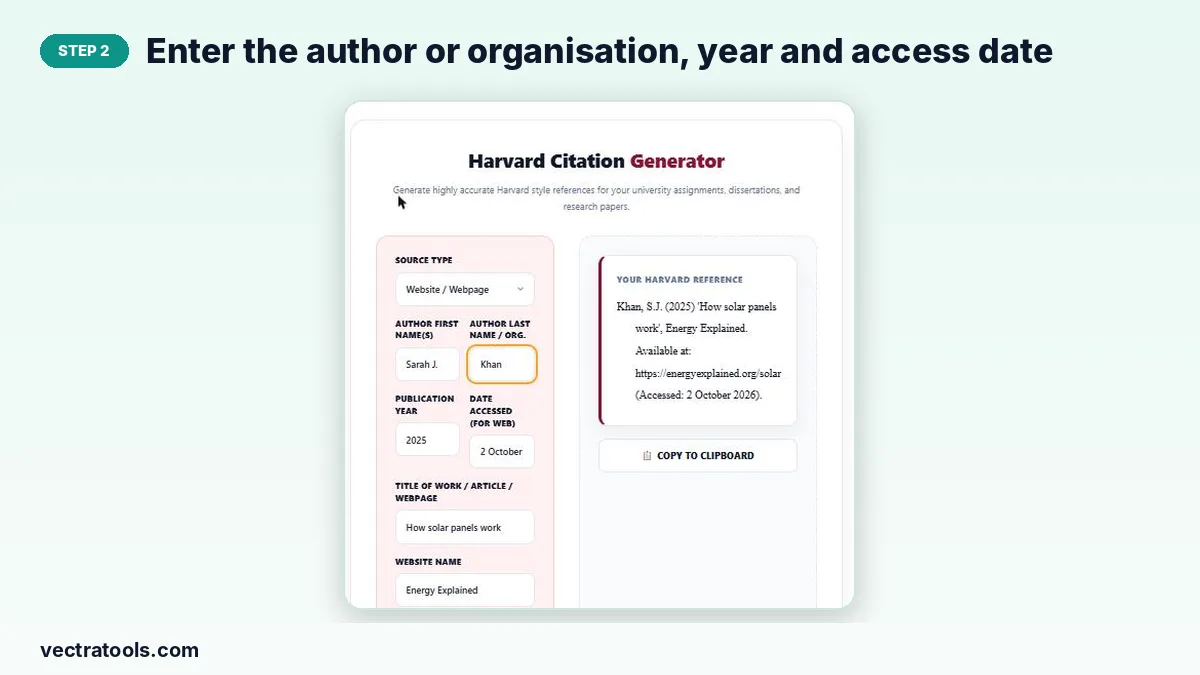
Step 3: Add the title, website and URL, then Create Reference
Enter the title, the website name (or city and publisher, or journal details) and the URL or DOI, then press Create Reference.

Step 4: Copy the finished Harvard reference
The reference appears with a hanging indent. Press Copy to Clipboard and paste it into your reference list, keeping the list in alphabetical order.

Harvard In-Text Citations
| Situation | In-text format |
|---|---|
| One author | (Khan, 2025) |
| Author named in sentence | Khan (2025) argues that… |
| Direct quote | (Clear, 2018, p. 27) |
| Two or three authors | (Khan and Ali, 2025) |
| Four or more authors | (Lopez et al., 2023) |
| Organisation | (BBC News, 2025) |
Tips for a Clean Reference List
- Sort entries alphabetically by author surname or organisation name.
- For two works by the same author in the same year, add a and b: (Khan, 2025a), (Khan, 2025b).
- Always include the accessed date for web pages, because online content changes.
- Use the DOI for journal articles where one exists.
Why Use a Harvard Citation Generator
Harvard rules on initials, brackets, italics and access dates are simple on their own but easy to mix up across a long reference list. A Harvard citation generator applies them the same way every time. Use this Harvard citation generator while you read, and paste each reference into your list as soon as you use a source, so nothing is missed at the deadline.
The Harvard citation generator is free, works on any device and never stores the details you type.
Frequently Asked Questions
What is Harvard referencing?
An author-date style: you cite the author and year in your text and list full details in a reference list at the end, sorted alphabetically.
Which Harvard version does the generator follow?
It follows the common Cite Them Right style used by many UK universities. Some institutions vary punctuation slightly, so compare with your module guide.
How do I cite a website with no author?
Put the organisation name in the last-name box, or leave both name fields empty and the title will move to the front of the reference.
Do I need an accessed date?
Yes for online sources. Harvard asks for the date you viewed the page, written as “Accessed: 2 October 2026”.
How are first names shown?
As initials without spaces, so “Sarah J.” becomes S.J. and “Maria Elena” becomes M.E.
Is the Harvard citation generator free?
Yes. It is free, works without an account and runs in your browser.