

GST Calculator India – Add or Remove GST with CGST & SGST Breakdown
GST Calculator India
Calculate CGST, SGST, and Total Tax instantly

Quick answer
A GST calculator adds or removes Goods and Services Tax from a price. To add GST, multiply the amount by the rate: GST = amount × rate ÷ 100. To remove GST from an inclusive price, use GST = amount × rate ÷ (100 + rate). For example, ₹10,000 at 18% has GST of ₹1,800 (CGST ₹900 + SGST ₹900), making the total ₹11,800.
Our free GST calculator for India shows the base price, total GST, CGST and SGST split and the final amount in one click. It works both ways: add GST to a net price, or strip GST out of a price that already includes tax.
The quick rate buttons cover the current GST slabs introduced on 22 September 2025 (5%, 18% and 40%) plus the 3% rate for gold and silver, and you can type any other rate in the box.
What Is GST?
Goods and Services Tax (GST) is India's single indirect tax on the supply of goods and services. For a sale within one state it is split equally into CGST (central tax) and SGST (state tax). For a sale from one state to another, the full amount is charged as IGST.
Rates and rules are published by the Central Board of Indirect Taxes and Customs (CBIC). A GST calculator saves you from doing the percentage maths by hand on every invoice or bill.
How to Use the GST Calculator
Follow these four steps:
Step 1: Choose Add GST or Remove GST
Click Add GST (+) if your amount does not include tax yet, or Remove GST (-) if the price already includes GST and you want the base price.

Step 2: Enter the Amount
Type the price in the Amount (₹) box, for example 10000. Enter the number without commas.

Step 3: Select the GST Rate
Tap one of the slab buttons (3%, 5%, 18% or 40%) or type a custom rate in the GST Rate (%) box. Check the HSN or SAC code of your product or service if you are unsure of the rate.
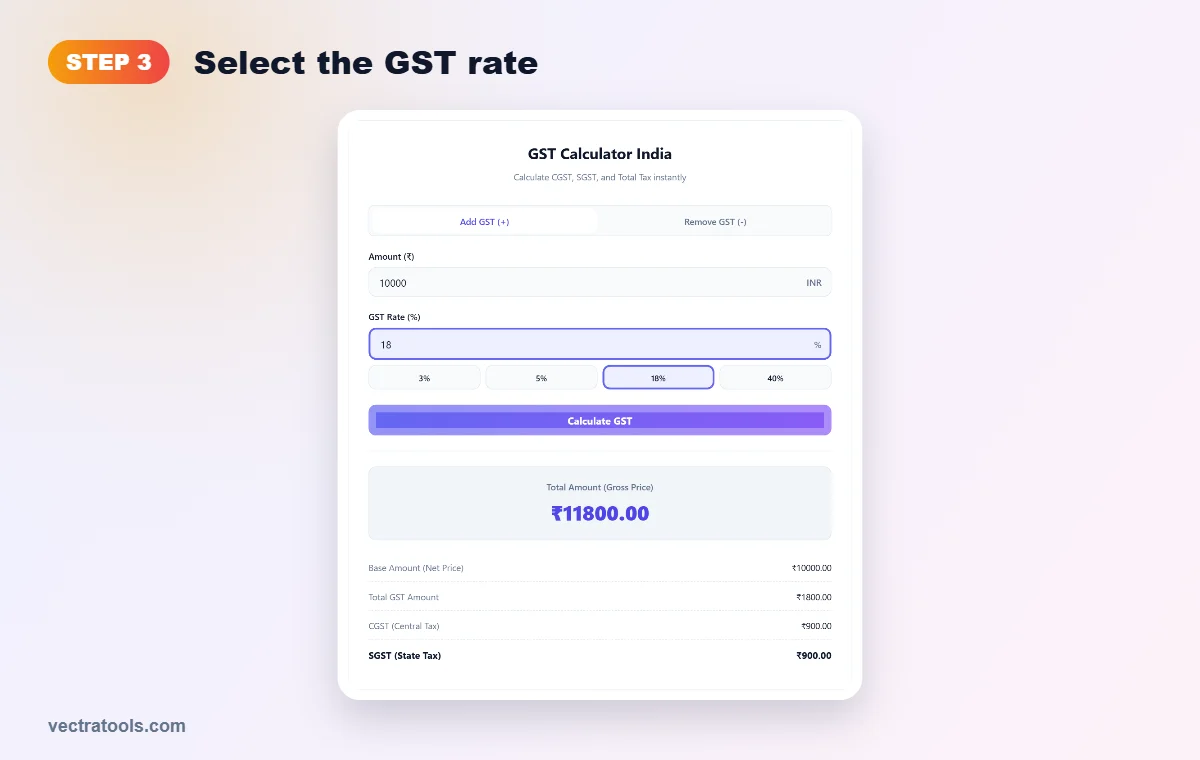
Step 4: Calculate and Read the Breakdown
Press Calculate GST. You will see the total amount, the base amount, the total GST and the CGST and SGST split. For inter-state supplies, treat the total GST figure as IGST.

GST Formulas
Remove GST: GST = Amount × Rate ÷ (100 + Rate) | Base = Amount − GST
Adding GST: ₹10,000 at 18% → GST = 10,000 × 18 ÷ 100 = ₹1,800. Total = ₹11,800, with CGST ₹900 and SGST ₹900.
Removing GST: ₹11,800 including 18% GST → GST = 11,800 × 18 ÷ 118 = ₹1,800. Base price = ₹10,000. A common mistake is to take 18% of ₹11,800 (₹2,124), which overstates the tax; the GST calculator avoids that error.
Current GST Slabs in India
Since 22 September 2025 (often called GST 2.0), most goods and services fall into a few main slabs:
| GST rate | Applies to (examples) |
|---|---|
| 0% (exempt) | Fresh produce, milk, many basic food items, some health and education services |
| 5% | Many everyday essentials and items moved down from the old 12% slab |
| 18% | Standard rate for most goods and services, including many items from the old 28% slab |
| 40% | Luxury and sin goods such as some high-end cars, tobacco products and sugary drinks |
| 3% | Gold, silver and jewellery |
Rates for specific products depend on their HSN or SAC code and can change, so always confirm the latest rate notified by CBIC before you issue an invoice.
GST Calculation Examples
| Amount | Rate | Mode | GST | CGST / SGST | Result |
|---|---|---|---|---|---|
| ₹1,000 | 5% | Add | ₹50 | ₹25 / ₹25 | Total ₹1,050 |
| ₹10,000 | 18% | Add | ₹1,800 | ₹900 / ₹900 | Total ₹11,800 |
| ₹50,000 | 40% | Add | ₹20,000 | ₹10,000 / ₹10,000 | Total ₹70,000 |
| ₹1,050 | 5% | Remove | ₹50 | ₹25 / ₹25 | Base ₹1,000 |
| ₹5,900 | 18% | Remove | ₹900 | ₹450 / ₹450 | Base ₹5,000 |
Who Uses a GST Calculator?
- Business owners and shopkeepers preparing invoices and quotes.
- Freelancers and consultants adding 18% GST to service fees.
- Accountants checking CGST, SGST and IGST figures before filing returns.
- Shoppers who want to know how much tax is inside a price.
Tips for Accurate GST
- Use the right mode: choose Remove GST when the price is tax-inclusive.
- Confirm the HSN/SAC rate for your product before billing.
- Intra-state vs inter-state: split CGST and SGST within a state, charge IGST across states.
- Round at the invoice level: follow your accounting software or CA's rounding rule.
- Keep records: save the base amount and tax separately for input tax credit.
Why Use This GST Calculator?
- Two-way: add GST or reverse-calculate it from an inclusive price.
- Full breakdown: base, total GST, CGST and SGST in one view.
- Current slabs: one-tap 3%, 5%, 18% and 40% buttons plus custom rates.
- Private and free: runs in your browser with no sign-up.
Frequently Asked Questions
How do I calculate GST on an amount?
Multiply the amount by the GST rate and divide by 100. For ₹10,000 at 18%, GST is ₹1,800 and the total is ₹11,800. The GST calculator does this instantly.
How do I remove GST from a total price?
Multiply the inclusive price by the rate and divide by (100 + rate). For ₹11,800 including 18% GST, the GST is ₹1,800 and the base price is ₹10,000.
What are the new GST slabs from September 2025?
From 22 September 2025 the main rates are 5% and 18%, with a 40% rate for luxury and sin goods, while gold and silver stay at 3% and some essentials are exempt.
What is the difference between CGST, SGST and IGST?
CGST and SGST are charged equally on sales within the same state. IGST is charged on sales between states and equals the full GST amount.
Is GST charged on the discounted price?
Yes. If a discount is shown on the invoice before tax, GST is calculated on the price after the discount.
Is my data saved?
No. The GST calculator runs in your browser and nothing you enter is stored.