

Font Pairing Tool – Preview Google Font Combinations and Copy the CSS
Font Pairing Tool
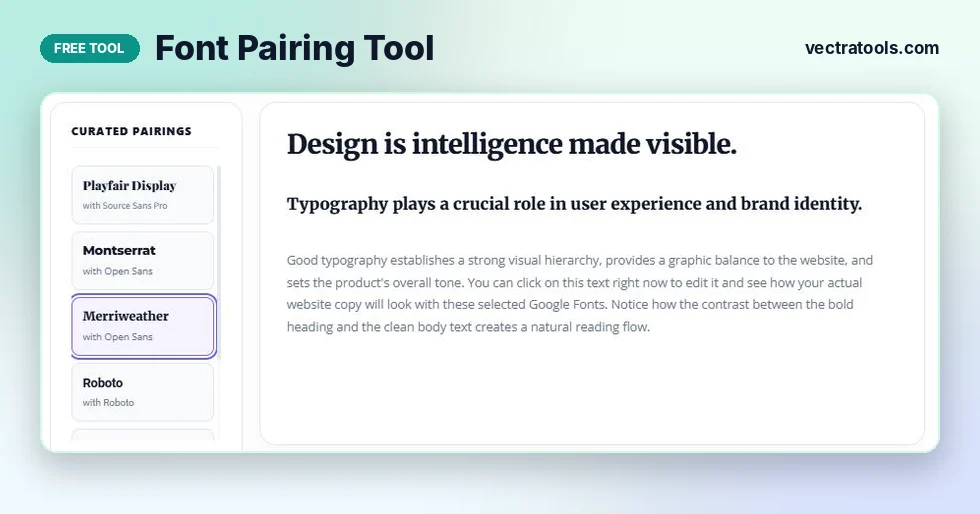
Find the perfect typographic harmony for your website. Select a curated Google Fonts pairing below and see it live on the canvas.
Quick answer
Click one of the six curated pairings, such as Merriweather with Open Sans, and the font pairing tool shows it on a sample heading, subheading and paragraph. Click the preview text to type your own words. When you like the look, press Copy Code to get the Google Fonts link tag and the CSS rules for headings and body text.
Fonts set the mood of a website before anyone reads a word. A heading font with character paired with a calm, readable body font makes a page look planned. Two fonts that fight each other make it look messy, even when the layout is good.
This font pairing tool lets you test proven Google Font combinations on real text in seconds. You see the heading and body fonts together at their actual sizes, then copy ready-made code for your site.
Font Pairings in the Tool
| Heading font | Body font | Style | Good for |
|---|---|---|---|
| Playfair Display (serif) | Source Sans Pro | Elegant, editorial | Blogs, magazines, fashion, weddings |
| Montserrat (sans-serif) | Open Sans | Modern, confident | Agencies, startups, portfolios |
| Merriweather (serif) | Open Sans | Warm, trustworthy | News, education, long articles |
| Roboto | Roboto | Neutral, technical | Apps, dashboards, documentation |
| Raleway (sans-serif) | Open Sans | Light, stylish | Creative studios, events, lifestyle brands |
| Poppins (sans-serif) | Source Sans Pro | Friendly, geometric | SaaS, landing pages, online shops |
How to Use the Font Pairing Tool
The tool opens with Playfair Display and Source Sans Pro selected. Everything updates as soon as you click.
Step 1: Pick a font pairing from the list
Under Curated Pairings, each card shows the heading font in its own style and the body font below it. Click a card. The preview on the right switches to that pairing straight away.

Step 2: Type your own text in the preview
Click the large heading, the subheading or the paragraph and type over it. Use your real headline and a few lines of your own copy. Fonts look different with your words than with sample text, so this is the best way to judge a pairing.

Step 3: Copy the HTML and CSS code
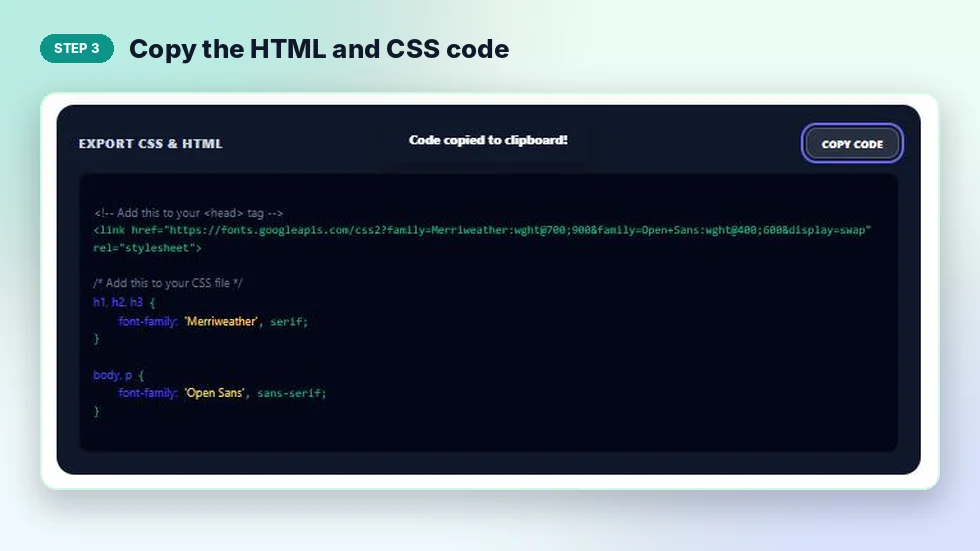
Scroll to Export CSS and HTML and press Copy Code. You get a link tag to paste inside the head of your page and CSS that applies the heading font to h1, h2 and h3 and the body font to body and p.
What the Copied Code Looks Like
For Merriweather with Open Sans, the tool gives you a single Google Fonts link that loads Merriweather in weights 700 and 900 for headings and Open Sans in 400 and 600 for body text, followed by two CSS rules:
h1, h2, h3 { font-family: 'Merriweather', serif; }body, p { font-family: 'Open Sans', sans-serif; }
When the heading and body font are the same, as with Roboto, the link loads one family in weights 400, 700 and 900. Each rule includes a fallback such as serif or sans-serif, so text still shows in a similar style if the font fails to load.
Rules for Pairing Fonts
- Create contrast. A serif heading with a sans-serif body is the classic safe choice. Two very similar fonts look like a mistake.
- Keep the body font simple. Body text is read at small sizes for long stretches, so clarity matters more than personality.
- Use two fonts at most. Add variety with weight and size instead of a third typeface.
- Match the mood of the brand. Playfair Display feels formal and elegant, while Poppins feels friendly and modern.
- Load only the weights you use. Every extra weight adds file size and slows the page.
Why Test Fonts with a Font Pairing Tool
Switching fonts inside a live website means editing code, saving and refreshing over and over. A font pairing tool shows each combination instantly on the same text, so you can compare them side by side in a minute. It also removes guesswork from the code, because the link and CSS come out correctly formatted and ready to paste.
Once your fonts are set, the typography scale generator can help you choose consistent heading sizes to go with them.
Frequently Asked Questions
Is this font pairing tool free?
Yes. It is free with no sign-up, and all the fonts are free Google Fonts.
Can I use these fonts on a commercial website?
All six pairings use Google Fonts, which are released under open licences that allow commercial use.
Can I preview my own text?
Yes. Click the heading, subheading or paragraph in the preview and type your own words.
What does Copy Code give me?
A Google Fonts link tag for the head of your page and CSS rules that set the heading and body fonts.
How do I add the fonts to WordPress?
Paste the link tag into your theme header or a header code plugin, then add the CSS to Additional CSS in the Customizer.
Why use a serif and a sans-serif together?
The difference in style creates clear contrast between headings and body text, which makes a page easier to scan.