

Customer Churn Rate Calculator – SaaS Churn in 3 Easy Steps
Customer Churn Calculator
Use this customer churn rate calculator to find your SaaS churn rate instantly. Measure how many subscribers you are losing over a specific period.
Use this free customer churn rate calculator to see how many customers or subscribers you lose in a month, quarter or year. Enter customers at the start, new customers added and customers lost, and the tool shows churn rate, retention rate, end-of-period customers and net growth, with a health label based on SaaS benchmarks.
Quick answer
Customer churn rate = customers lost during the period ÷ customers at the start × 100. If you start the month with 1,000 customers and lose 50, churn is 5% and retention is 95%. Many B2B SaaS companies aim for monthly churn below 3%, while 3% to 5% is common and above 10% needs urgent attention.
Table of Contents
Churn is the quiet leak in a subscription business. You can add 150 new customers a month and still shrink if too many existing ones cancel.
This customer churn rate calculator shows the leak in one clear number, so you can track it every period and see whether retention work is paying off.
Customer Churn Rate Formula
- Churn rate (%) = customers lost ÷ customers at start × 100
- Retention rate (%) = 100 − churn rate
- End customers = start + new − lost
- Net growth = new − lost
New customers added during the period are not part of the churn rate. They only change the end-of-period total. This keeps churn focused on the customers you already had.
Churn Rate Examples
| Start | New | Lost | Churn | Retention | End | Net growth |
|---|---|---|---|---|---|---|
| 1,000 | 150 | 50 | 5.00% | 95.00% | 1,100 | +100 |
| 800 | 40 | 96 | 12.00% | 88.00% | 744 | −56 |
| 2,500 | 200 | 50 | 2.00% | 98.00% | 2,650 | +150 |
| 400 | 30 | 24 | 6.00% | 94.00% | 406 | +6 |
How to Use the Customer Churn Rate Calculator
Step 1: Enter Your Period Data
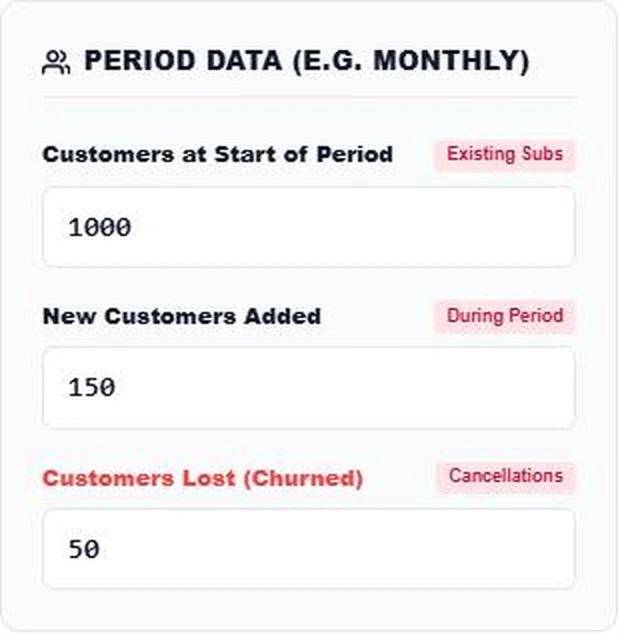
Choose a period, usually one month. Enter Customers at Start of Period, New Customers Added and Customers Lost (Churned). Count only paying customers who cancelled or did not renew in that period.
Step 2: Read Churn and Retention
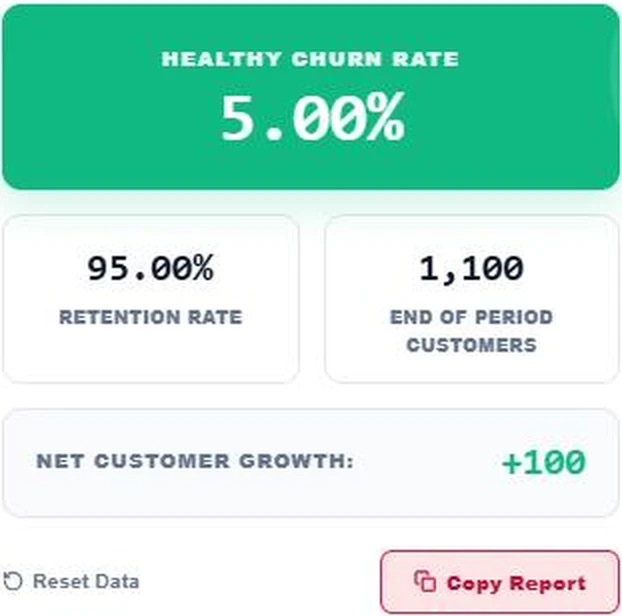
With 1,000 starting customers, 150 new and 50 lost, the calculator shows a 5.00% churn rate marked as healthy, a 95.00% retention rate, 1,100 customers at the end and net growth of +100.
Step 3: Compare With Churn Benchmarks
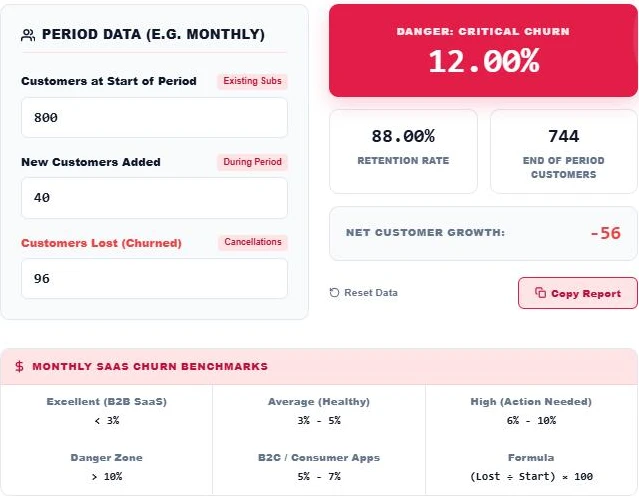
Test a weaker month. With 800 customers, 40 new and 96 lost, churn jumps to 12.00%, the card turns red with a critical churn warning, and net growth falls to −56. The benchmark panel shows where your number sits, from excellent below 3% to the danger zone above 10%.
What Is a Good Churn Rate?
| Monthly churn | Rating | What to do |
|---|---|---|
| Below 3% | Excellent | Typical of strong B2B SaaS. Keep improving onboarding and expansion. |
| 3% – 5% | Average | Healthy for many products. Look for easy retention wins. |
| 5% – 7% | Common for B2C apps | Expected for many consumer subscriptions. |
| 6% – 10% | High | Find out why customers leave and fix the main cause. |
| Above 10% | Danger zone | Growth will stall. Retention should be the top priority. |
Monthly vs Annual Churn
Monthly churn compounds over a year. A 5% monthly churn does not mean 60% a year. Annual retention is 0.9512 = 54.0%, so annual churn is about 46%. At 2% monthly churn, annual churn is about 21.5%.
How to Reduce Customer Churn
- Improve onboarding so new customers reach their first success quickly.
- Watch usage and contact accounts that go quiet.
- Ask cancelling customers why they are leaving and group the answers.
- Offer annual plans, which usually churn less than monthly ones.
- Fix failed payments with reminders and card update emails, since involuntary churn is often easy to recover.
Customer Churn vs Revenue Churn
The customer churn rate calculator counts people. Revenue churn counts money. If a small customer on a $10 plan leaves, customer churn rises but revenue barely moves. If one large account on a $2,000 plan cancels, revenue churn can jump even when customer churn looks low.
Track both. Customer churn shows how well the product keeps users happy, while revenue churn shows the real financial impact.
Voluntary vs Involuntary Churn
- Voluntary churn: the customer chooses to cancel because of price, missing features or a better competitor.
- Involuntary churn: the payment fails because a card expired or was declined, even though the customer wanted to stay.
Measuring more SaaS metrics? Try the Customer Lifetime Value Calculator, the Customer Acquisition Cost Calculator or the Lead Conversion Funnel Calculator.
Frequently Asked Questions
How do I calculate customer churn rate?
Divide customers lost in the period by customers at the start of the period and multiply by 100. 50 ÷ 1,000 × 100 = 5%.
Should new customers be included in churn?
Not in the basic formula. New customers change the end total, but churn is measured against the customers you had at the start.
What is the difference between churn and retention?
They are opposites. Retention rate is 100% minus churn rate, so 5% churn means 95% retention.
What is a good monthly churn rate for SaaS?
Below 3% is excellent for B2B SaaS, 3% to 5% is average, and above 10% is a warning sign.
How do I turn monthly churn into annual churn?
Raise monthly retention to the power of 12 and subtract from 1. 5% monthly churn gives 1 − 0.95¹² = about 46% annual churn.
Is my data saved?
No. The calculator runs in your browser and nothing is stored.