

Punycode IDN Converter – Encode & Decode xn-- Domains in 3 Easy Steps
Punycode IDN Converter
Use this Punycode IDN converter to encode Internationalized Domain Names (Unicode/Emojis) to Punycode ASCII formats or decode them back instantly.
Use this free Punycode IDN converter to turn internationalised domain names with accents, non-Latin scripts or emoji into their Punycode (xn--) form, or decode Punycode back into readable Unicode. It follows the RFC 3492 Bootstring algorithm and converts each part of the domain separately.
Quick answer
Punycode is the ASCII form of an internationalised domain name (IDN). Each label containing non-ASCII characters is encoded and prefixed with "xn--", while plain ASCII labels stay the same. For example, münchen.com becomes xn--mnchen-3ya.com, bücher.de becomes xn--bcher-kva.de, and пример.рф becomes xn--e1afmkfd.xn--p1ai.
Table of Contents
The Domain Name System only understands a limited set of ASCII characters. To support names in Arabic, Chinese, Cyrillic, Hindi, accented Latin and even emoji, browsers convert them to Punycode behind the scenes. Website owners, SEO professionals and developers often need to see that hidden form when setting up DNS, SSL certificates, redirects or analytics.
This punycode idn converter shows both forms side by side and runs in your browser.
What Is Punycode?
Punycode is an encoding defined in RFC 3492 that represents Unicode characters using only letters, digits and hyphens. Combined with the IDNA standard, it lets domain names in any language work with existing DNS. The ASCII Compatible Encoding (ACE) prefix "xn--" tells software that a label is Punycode rather than an ordinary name.
How Punycode Encoding Works
- The domain is split into labels at each dot.
- Labels that are already plain ASCII are left as they are.
- For other labels, the ASCII characters are written first, followed by a hyphen.
- The positions and code points of the non-ASCII characters are encoded as a compact string of letters and digits.
- The prefix "xn--" is added to the encoded label.
That is why xn--mnchen-3ya keeps the readable "mnchen" part: the ASCII letters come first, and "3ya" encodes where the ü goes.
IDN to Punycode Examples
| Unicode domain | Punycode (ASCII) |
|---|---|
| münchen.com | xn--mnchen-3ya.com |
| bücher.de | xn--bcher-kva.de |
| décor.fr | xn--dcor-bpa.fr |
| ñandú.org | xn--and-6ma2c.org |
| 测试.cn | xn--0zwm56d.cn |
| пример.рф | xn--e1afmkfd.xn--p1ai |
| صابون.com | xn--mgbc1b5dj.com |
| 🚀.net | xn--158h.net |
How to Use the Punycode IDN Converter
Step 1: Enter an International Domain
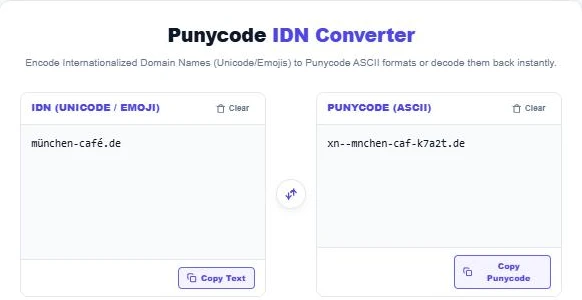
Type or paste a domain with special characters into the IDN (Unicode / Emoji) panel. The Punycode appears instantly on the right; münchen-café.de becomes xn--mnchen-caf-k7a2t.de.
Step 2: Decode Punycode Back to Unicode
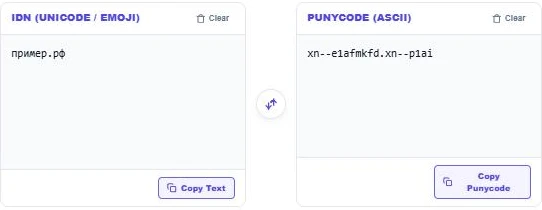
Paste an xn-- domain into the Punycode (ASCII) panel to see the readable version. xn--e1afmkfd.xn--p1ai decodes to пример.рф. A warning appears if a segment is malformed.
Step 3: Check the Common Examples
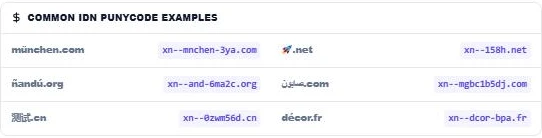
The examples table shows well-known conversions in German, Spanish, Arabic, Chinese, French and emoji, so you can compare your result or learn the pattern.
Why Punycode Matters
- DNS and hosting: many control panels require the xn-- form when you add a domain or DNS record.
- SSL certificates: certificates list the Punycode name, so you need it to check coverage.
- Email: some mail systems only accept the ASCII form of an IDN.
- SEO and analytics: log files, crawlers and some reports show Punycode instead of Unicode.
- Security: decoding suspicious xn-- links helps spot look-alike phishing domains.
Spotting Homograph Attacks
Some scripts contain letters that look identical to Latin ones, such as the Cyrillic "а" and the Latin "a". Attackers register look-alike domains to trick users. When a link looks odd, decode it: a domain that appears to be a well-known brand but has an xn-- form is a warning sign. Modern browsers show the Punycode form when they detect mixed scripts for this reason.
Working on domains and links? Expand short links with the Short URL Expander or clean URL lists with the Smart URL Deduplicator.
Frequently Asked Questions
What does xn-- mean in a domain?
It is the ACE prefix that marks a label as Punycode, meaning the original name contains non-ASCII characters.
How do I convert a domain to Punycode?
Paste the Unicode domain into the converter. Each non-ASCII label is encoded and prefixed with xn--.
Can emoji domains be converted?
Yes. For example, 🚀.net becomes xn--158h.net, although only some top-level domains allow emoji.
Does Punycode change the top-level domain?
Only if the TLD itself uses non-ASCII characters, such as .рф, which becomes .xn--p1ai.
Is Punycode the same as URL encoding?
No. URL (percent) encoding is used in paths and query strings. Punycode is only for the domain name.
Is my input stored?
No. The punycode idn converter runs entirely in your browser.