

Limit Calculator Online – Two-Sided, Left and Right Limits
Limit Calculator
Evaluate mathematical limits instantly. Find left-hand, right-hand, and two-sided limits at any specific point or infinity.
inf or Infinity in the approaches field.
Quick answer
A limit calculator finds the value a function approaches as its input gets close to a point. Enter f(x), the variable, the value it approaches (a number, inf or -inf) and choose two-sided, left-hand or right-hand, then click Evaluate Limit. For example, the limit of (x² − 1)/(x − 1) as x → 1 is 2, even though the function is undefined at x = 1.
Our free limit calculator evaluates limits numerically by checking the function just to the left and just to the right of the target point. If both sides agree, it returns the limit; if they disagree, it reports that the limit does not exist; and if values grow without bound, it shows ∞ or −∞.
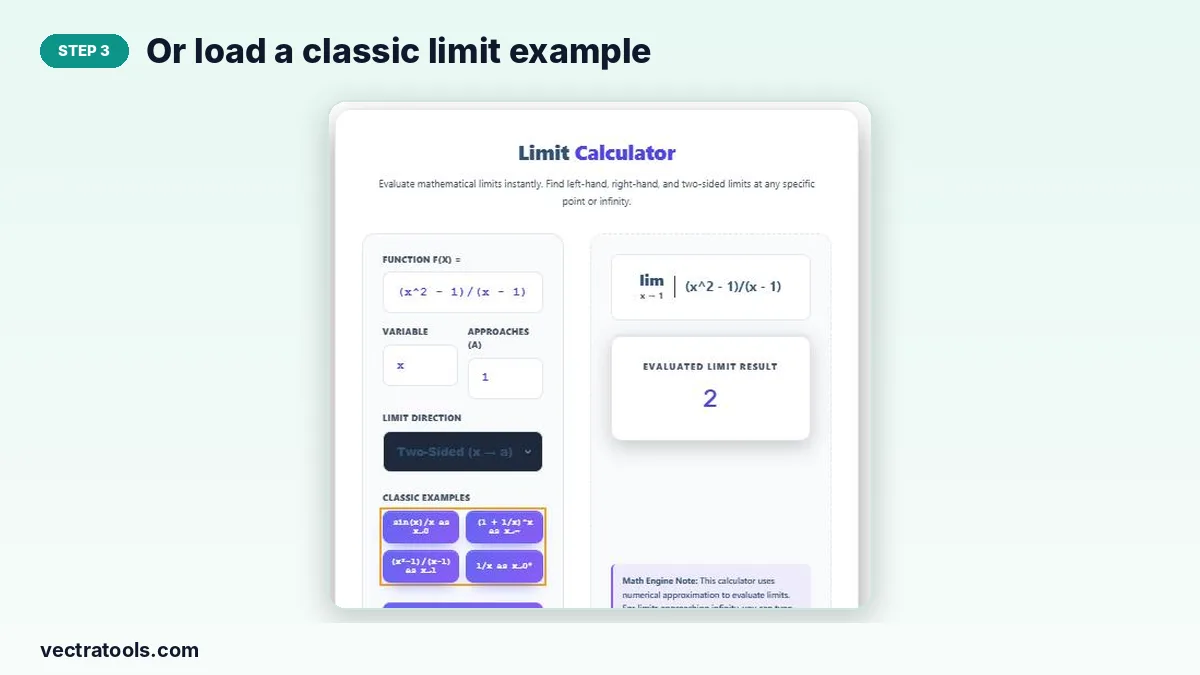
Four classic examples are built in: sin(x)/x as x → 0, (1 + 1/x)^x as x → ∞, (x² − 1)/(x − 1) as x → 1 and 1/x as x → 0⁺.
Types of Limits
| Limit | Notation | Meaning |
|---|---|---|
| Two-sided | lim x→a f(x) | Left and right values must approach the same number |
| Left-hand | lim x→a⁻ f(x) | x approaches a from values smaller than a |
| Right-hand | lim x→a⁺ f(x) | x approaches a from values larger than a |
| At infinity | lim x→∞ f(x) | Behaviour as x grows without bound |
Classic Limit Results
- lim x→0 sin(x)/x = 1
- lim x→∞ (1 + 1/x)^x = e ≈ 2.718282
- lim x→1 (x² − 1)/(x − 1) = 2
- lim x→0⁺ 1/x = ∞, lim x→0⁻ 1/x = −∞, so the two-sided limit does not exist
How to Use the Limit Calculator
Use the limit calculator in four steps.
Step 1: Enter the Function and Variable
Type f(x), such as (x^2 - 1)/(x - 1), and keep the variable as x unless your function uses another letter.

Step 2: Set the Value It Approaches and the Direction
Enter the target value a (use inf or -inf for infinity) and choose Two-Sided, Left-Hand or Right-Hand.

Step 3: Or Load a Classic Limit Example
Tap a classic example to fill in all the fields automatically.
Step 4: Evaluate and Read the Limit
Click Evaluate Limit. The notation shows your limit and the result card shows its value, ∞, −∞ or Does Not Exist.

When Does a Limit Not Exist?
- The left-hand and right-hand limits are different (a jump).
- The function grows without bound in opposite directions on each side, as with 1/x at 0.
- The function oscillates forever, like sin(1/x) near 0.
Tips for Using a Limit Calculator
- Check one-sided limits when the two-sided result does not exist.
- Remember that a limit can exist even if f(a) is undefined.
- Numerical methods may struggle with extremely steep or oscillating functions; confirm such cases algebraically.
- Use L’Hôpital’s rule or factorising to verify 0/0 forms by hand.
Why Use a Limit Calculator?
Limits are the foundation of calculus, defining derivatives, continuity and integrals. A limit calculator lets you test ideas quickly, check answers and build intuition for how functions behave near tricky points.
Frequently Asked Questions
Is this limit calculator free?
Yes. It is free with no sign-up.
How do I enter infinity?
Type inf for positive infinity or -inf for negative infinity in the Approaches field.
What does Does Not Exist mean?
The left and right limits disagree, so there is no single two-sided limit.
Is the result exact?
The calculator uses numerical approximation, which matches exact values for most standard limits.
What is lim x→0 sin(x)/x?
It equals 1.
Can I find one-sided limits?
Yes. Choose Left-Hand or Right-Hand in Limit Direction.