

Braille Text Translator – Convert English to Braille & Back in 3 Easy Steps
Braille Translator
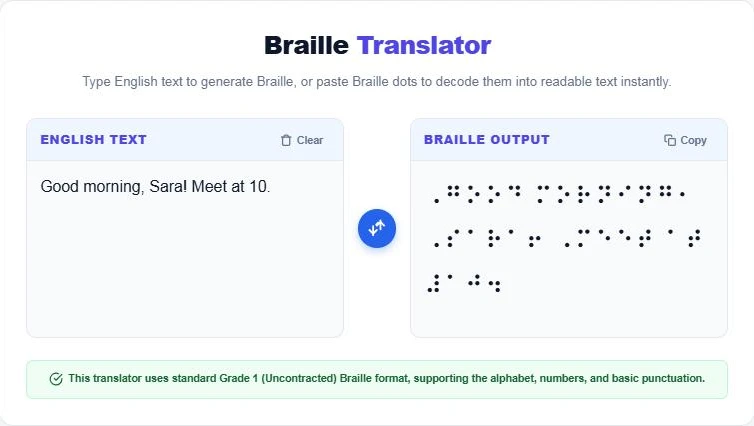
Use this Braille text translator: type English text to generate Braille, or paste Braille dots to decode them into readable text instantly.
Use this free Braille text translator to turn English text into Braille dots, or paste Braille characters to decode them back into readable English. It follows standard Grade 1 (uncontracted) Braille for letters, numbers and common punctuation, and the output uses Unicode Braille symbols you can copy into documents, signs and messages.
Quick answer
Each Braille character is a cell of up to six raised dots arranged in two columns of three. Letters map one-to-one in Grade 1 Braille, a capital sign (dot 6) comes before capital letters, and a number sign (dots 3-4-5-6) comes before digits, which reuse the letters a to j. For example, "Hello" becomes ⠠⠓⠑⠇⠇⠕ and "2026" becomes ⠼⠃⠚⠃⠋.
Table of Contents
Braille gives blind and low-vision people independent access to reading and writing. Sighted teachers, parents, designers and students often need to check what a Braille label says or prepare simple Braille text without learning the full code first.
This braille text translator works both ways in real time and runs in your browser.
What Is Braille?
Braille is a tactile writing system created by Louis Braille, a French student who lost his sight as a child and first published the system in 1829. Readers feel patterns of raised dots with their fingertips. Each six-dot cell can form 63 different patterns, which represent letters, numbers, punctuation and, in contracted Braille, whole words or letter groups.
How Braille Cells Work
- Dots are numbered 1, 2 and 3 down the left column, and 4, 5 and 6 down the right column.
- The letters a to j use only the top four dots (1, 2, 4 and 5).
- The letters k to t add dot 3 to the a to j patterns.
- The letters u, v, x, y and z add dots 3 and 6. The letter w is a special pattern, since French did not use w when the system was designed.
- A capital sign (dot 6) before a letter makes it uppercase.
- A number sign (dots 3, 4, 5 and 6) turns the next letters a to j into the digits 1 to 0.
Braille Alphabet Reference
| Letter | Braille | Letter | Braille | Letter | Braille |
|---|---|---|---|---|---|
| a | ⠁ | j | ⠚ | s | ⠎ |
| b | ⠃ | k | ⠅ | t | ⠞ |
| c | ⠉ | l | ⠇ | u | ⠥ |
| d | ⠙ | m | ⠍ | v | ⠧ |
| e | ⠑ | n | ⠝ | w | ⠺ |
| f | ⠋ | o | ⠕ | x | ⠭ |
| g | ⠛ | p | ⠏ | y | ⠽ |
| h | ⠓ | q | ⠟ | z | ⠵ |
| i | ⠊ | r | ⠗ | number sign | ⠼ |
Grade 1 vs Grade 2 Braille
Grade 1 (uncontracted) Braille spells every word letter by letter. It is easy to learn and ideal for labels, names and beginners. Grade 2 (contracted) Braille uses shortcuts for common words and letter groups such as "and", "the" and "ing", which saves space and is what most experienced readers use for books. Since 2016 the United States has used Unified English Braille (UEB), as do the UK, Australia and other English-speaking countries.
How to Use the Braille Text Translator
Step 1: Type or Paste English Text
Enter your text in the English Text box. The Braille appears instantly on the right, with capital and number signs added where needed.
Step 2: Copy the Braille Output
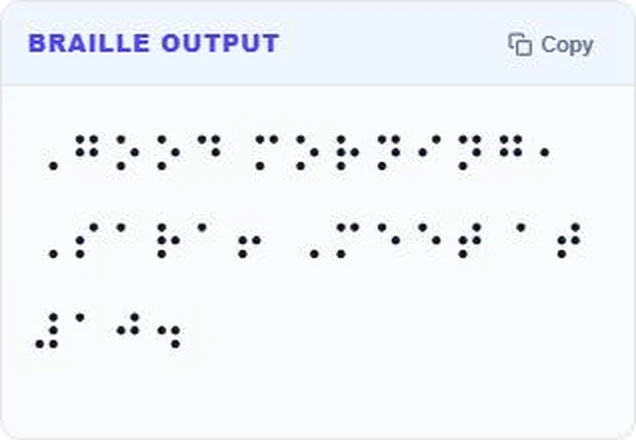
Press Copy to copy the Braille characters. They are standard Unicode Braille symbols, so they paste into Word, Google Docs, emails and most apps. Use Clear to start again.
Step 3: Decode Braille Back to Text
Paste Unicode Braille into the Braille Output box, or use the swap button, and the English text appears on the left. For example, ⠠⠓⠑⠇⠇⠕ ⠺⠕⠗⠇⠙⠖ decodes to "Hello world!".

Who Uses a Braille Translator?
- Teachers preparing simple Braille worksheets and classroom labels.
- Parents and family members learning alongside a Braille reader.
- Designers checking Braille text for signs, packaging and accessibility projects.
- Students studying the Braille system or accessibility in design courses.
- Anyone curious to see their name or a short message in Braille.
Important Notes for Physical Braille
On-screen Braille symbols are not tactile. For real signs, menus or labels, the text must be embossed or printed with raised dots at the correct size and spacing. Public signage usually has to meet accessibility standards, and complex documents should be checked by a qualified Braille transcriber, especially when Grade 2 contractions are required.
Exploring other codes and encodings? Try the Base58 Encoder Decoder or the Gray Code to Binary Converter.
Frequently Asked Questions
How do I convert text to Braille?
Type your text into the English box and the Braille translator shows the Grade 1 Braille instantly. Copy it with one click.
Can I translate Braille back to English?
Yes. Paste Unicode Braille characters into the Braille box and the English text appears.
Does the translator use Grade 1 or Grade 2 Braille?
It uses Grade 1 (uncontracted) Braille, which spells words letter by letter.
How are numbers written in Braille?
A number sign (⠼) comes first, then the letters a to j stand for 1 to 0. So 10 is ⠼⠁⠚.
Can I print the output as real Braille?
The output is visual Unicode Braille. For tactile Braille, use a Braille embosser or a professional transcription service.
Is my text stored?
No. The braille text translator runs entirely in your browser.