

JSON Minifier – Free Online Tool to Minify & Compress JSON
JSON Minifier & Validator
Compress unoptimized structural arrays packets, eliminate redundant whitespaces, and validate syntax instantly.
Compress JSON Data for Faster API Responses
Welcome to the fastest and most secure JSON minifier available online. Sending bloated JSON files slows down your applications. Extra spaces, line breaks, and tabs make the code readable for developers, but they add unnecessary weight to your server responses. Our JSON Minifier strips out all that useless formatting in a fraction of a second, running entirely within your browser.
Before you compress the data, it is always a smart move to verify your syntax. A single misplaced comma or missing bracket can easily break an entire build. We recommend running your code through our JSON Validator first to catch any hidden errors.
Once you know the syntax is perfectly valid, paste your data below. You will instantly get a clean, compact output that is ready for your production environment.
What Is JSON Minification?
When developers write or format code, they naturally use line breaks, heavy indentation, and spaces to keep everything visually organized and easy to read. However, web browsers and backend servers do not need any of these visual aids to understand or process the data.
JSON minification is the simple process of stripping away all that unnecessary whitespace, newlines, and tab characters from your code.
By using a dedicated JSON compressor, you essentially compress JSON data into a single continuous string of text. If you want to minify JSON effectively, this process allows you to significantly reduce JSON file size without changing any of the actual structural keys or values inside your payload. The ultimate goal is to make your data output as lightweight as possible so it can be transmitted across the network at maximum speed.
JSON Minification Before and After Example
To see exactly how an online JSON minifier works in real time, let us look at a simple block of code. When developers write configuration files, they space everything out so it is easy to read and edit.
Here is what a standard formatted payload looks like:
{
  "project": "VectraTools",
  "utility": "JSON Compressor",
  "status": "active",
  "optimized": true
}
Once you run this exact same code through a JSON compressor online tool, it strips away every single visual space and line break.
Here is what the final output looks like:
{"project":"VectraTools","utility":"JSON Compressor","status":"active","optimized":true}As you can clearly see, both versions contain the exact same data and keys. However, the second version takes up much less space. While it might look cluttered to the human eye, web browsers and backend servers prefer this compact layout. This is why you should always compress JSON online before deploying your web applications to production.
How to Use the JSON Minifier (A Step-by-Step Guide)
Want to see how fast the tool works? You can use the sample data below to test the minifier right now.
Valid JSON (For successful compression testing):
Invalid JSON (To test the error detection): (Notice the missing closing brace } and comma after the features array)
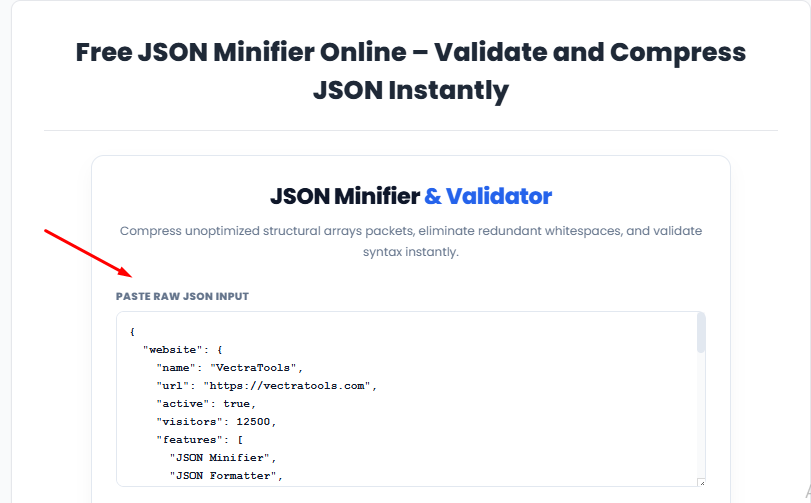
Step 1: Paste your raw JSON data Copy either of the test codes above and paste it directly into the top input box labeled "Paste Raw JSON Input". There are no restrictive file size limits, so you can easily paste massive server payloads here.
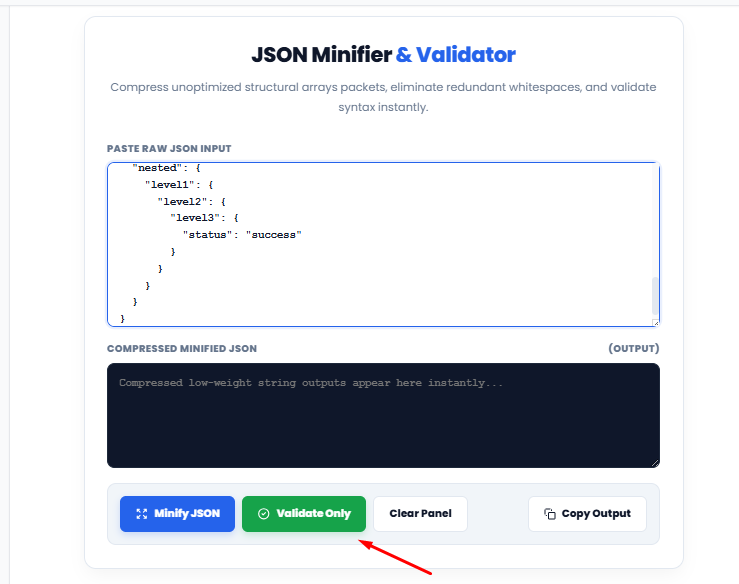
Step 2: Validate the syntax (Optional but recommended) Before compressing, click the green Validate Only button. If you used the valid code, a success message will appear in the output box confirming your syntax is clean. If you used the invalid code, the tool will immediately catch the error.
Step 3: Compress the data Once your data is validated, click the blue Minify JSON button. The tool processes everything locally inside your browser. Because nothing is uploaded to a remote server, your data remains completely private.
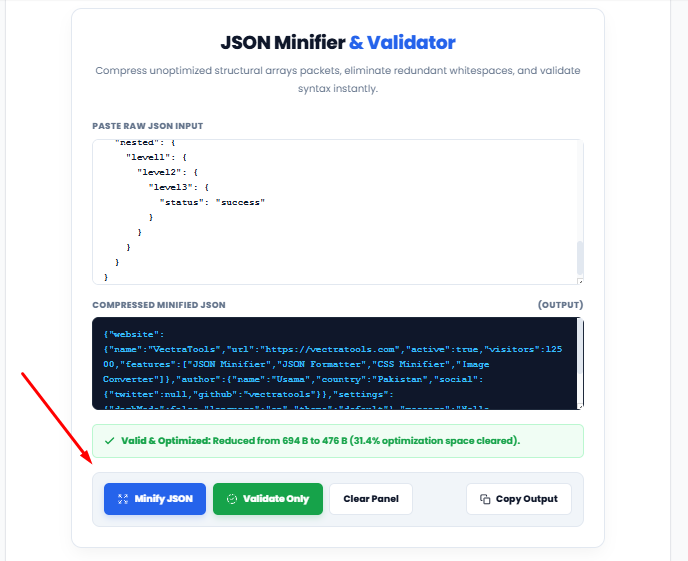
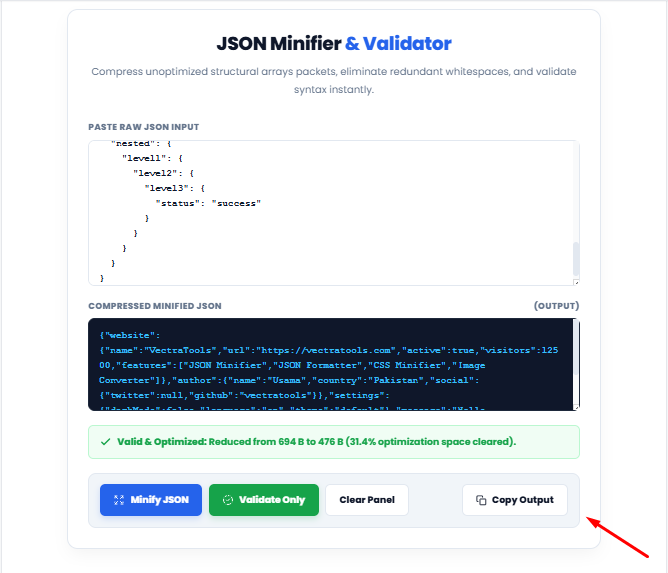
Step 4: Check your savings and copy the output Instantly, the compressed code will appear in the dark output panel. Look just below the panel to see the green success bar. It shows you exactly how many bytes were reduced and your total optimization percentage. Hit the Copy Output button and paste your lightweight code into your project.
Comparison: VectraTools vs. Other Websites
Most online minifiers make you wait through slow loading screens or dodge annoying ads just to format a simple string of text. We took a completely different approach. Since our tool runs locally in your browser, you never have to worry about server delays or privacy risks.
Here is a quick look at how our platform compares to standard alternatives:
| Metric | VectraTools JSON Minifier | Typical Competitor Sites |
| Processing Speed | Instant, client-side execution | Often delayed by server round-trips |
| Ad-Free Experience | Yes, no interruptions | Frequently loaded with ads and pop-ups |
| 100% Client-Side Safety | We handle all formatting locally without sending a single byte over the internet. | Traditional utilities require you to upload your raw payloads before compressing them. |
| Accuracy | Consistent, standard-compliant output | Varies, some tools mishandle edge cases |
Why Developers Choose Our JSON Minifier
- Lightweight Architecture: We built this platform strictly using plain HTML, CSS, and JavaScript. This keeps the page size incredibly small, ensuring it loads almost instantly even on a weak internet connection.
- Total Privacy: All data processing happens entirely within your browser. Your raw JSON code never touches our servers, guaranteeing complete client-side security.
- Instant Output: You will never see a loading spinner or an artificial delay. The moment you hit the minify button, your compressed text is ready to copy.
- Mobile-Friendly Design: Developer tools should not be restricted to desktop screens. This interface scales perfectly, allowing you to format and compress data smoothly from your phone or tablet.
- Zero Restrictions: There are no hidden paywalls or premium tiers. You do not need to create an account, hand over your email address, or worry about daily usage limits.
When Should You Minify JSON?
Now that you know how to compress JSON, you might wonder when it is actually necessary to use this technique in your daily development workflow. Generally speaking, you should keep your files formatted and easy to read while you are actively writing or debugging code on your local machine. However, the moment you prepare to move that code to a live server, minification becomes absolutely essential.
Here are the most common scenarios where you must reduce your payload weight:
- Live Production Environments: Always compress your configuration files before deploying a web application to the public. Smaller files mean faster initial load times for your actual users.
- Heavy API Responses: If your backend server sends massive payloads of data to a frontend interface, you need to learn how to reduce JSON file size to save server bandwidth and speed up the overall user experience.
- Data Storage: When saving large application logs or user states into a database, removing all that extra whitespace helps you save valuable storage capacity over time.
Remember, before you finalize any compression, you should always check your code for errors. We highly recommend using a JSON syntax validator first. If you validate JSON code before shrinking it, you can easily avoid sending broken structures into your live applications.
The Benefits of Using a JSON Minifier
Minifying JSON manually is tedious and highly error-prone. You might easily miss a stray space or accidentally strip a required character that breaks your entire data structure. Using a dedicated compression tool removes that guesswork entirely.
Smaller JSON files directly translate to faster application load times, lower server bandwidth usage, and quicker parsing on the client side. If you are shipping large configuration files or API responses in a production environment, this size reduction creates a measurable performance boost, especially at scale.
Additionally, pairing this compression with our built-in validation step catches syntax errors before they cause problems downstream. Spotting a broken JSON structure here takes just a few seconds, whereas tracking it down after a live deployment can cost you hours of debugging.
JSON Minifier vs JSON Formatter
It is completely normal for new developers to confuse a JSON minifier with a JSON formatter. While they frequently appear side by side in developer toolkits, they perform entirely opposite functions in your software development lifecycle. Understanding the core difference is crucial for managing your data payloads effectively.
A JSON formatter acts as a visual organizer. It takes a raw, compressed string of data and carefully injects spaces, line breaks, and proper indentation. This transformation makes the code highly readable for human eyes. You will typically rely on a formatting utility when you need to explore complex nested objects, troubleshoot API responses, or when you want to validate JSON online to quickly spot a missing bracket or a hidden syntax error. Formatting is all about visual clarity and debugging.
An online JSON minifier does the exact opposite. Instead of adding empty space for human benefit, it aggressively removes every single unnecessary character, including tabs and line returns. It takes a beautifully structured document and crushes it down into one continuous, dense block of text. If you are currently researching how to minify JSON, your primary goal is performance. By stripping away the visual formatting, you drastically reduce the overall file size, which allows web browsers and backend servers to parse the incoming data instantly.
A great rule of thumb to remember is this: you format your code so that your team can read it, but you minify JSON online to ship it directly to your live production servers. Both utilities are absolutely essential for a complete web workflow, yet they belong in completely different phases of your project.
Frequently Asked Questions About JSON Minification
Is this JSON minifier completely free to use?
Yes, our online JSON minifier is 100% free. There are no sign-up requirements, hidden premium tiers, or daily usage limits to compress your data.
Does minifying JSON change my actual data or structure?
No. The minification process safely removes only the unnecessary whitespace, line breaks, and tab characters. Your actual data, keys, values, and overall structural integrity remain exactly the same.
Can I compress large JSON payloads with this tool?
Yes, you can easily minify massive JSON files. Because this compressor runs locally directly in your web browser instead of uploading to a remote server, it handles heavy files instantly without lagging.
Is it safe to minify private JSON data here?
Absolutely. Your code is processed entirely on the client-side. This means your sensitive JSON strings never leave your device, ensuring total privacy and security.
What is the difference between validating and minifying JSON?
Validation simply checks if your code has syntax errors so it does not break your application. Minifying compresses that valid code by removing extra spaces to reduce file size for faster API responses. We highly recommend validating your syntax first, and then minifying it for production.
More Helpful Developer Tools
If your daily development workflow involves more than just JSON, our platform has you covered. Before compressing your data, run your raw code through our JSON Validator to catch any hidden syntax errors before they break your application.
Beyond just JSON, we also offer a powerful CSS Minifier. Use it whenever you need to minify CSS files online, helping you cut down stylesheet sizes and optimize your frontend assets with zero hassle.
Using these utilities together makes it easy to optimize CSS and JSON side by side. You get clean, production-ready code instantly without switching between different websites or installing heavy desktop software.
Keep Your API Payloads Fast and Clean
Clean, compact JSON should not take more than a few seconds to produce. When building modern web applications, every extra byte you send across the network impacts the final user experience. By stripping away unnecessary whitespace and formatting characters, you are directly contributing to a faster, more responsive interface.
Minimizing file sizes is a core principle of overall web performance, allowing your server to parse and deliver API responses without delay. There is no need to rely on slow, ad-heavy platforms or download desktop software just to format a simple text string.
Bookmark this page for your daily development tasks. The next time you need to minify, format, or validate your code, our lightweight utility will be right here waiting for you, ready to work instantly inside your browser.
Why I Built This Tool (My Personal Experience)
As a student and an active web developer, I am constantly assigned daily coding and development tasks. Managing, formatting, and compressing JSON payloads manually was taking up too much of my valuable time. I originally built this JSON Minifier purely for my own personal use to speed up my daily workflow and handle my assignments more efficiently.
Since it worked flawlessly for my local projects—without the need to upload any data to third-party servers—I decided to publish it here so other developers and students can benefit from the same fast, client-side performance.
My Personal Rating: 5/5 I rate it highly because it does exactly what a developer needs: it is lightweight, secure, and gets the job done instantly without any unnecessary features.